

A 3-Hour Bank Reconciliation Now Takes Me 20 Minutes. Here’s Exactly How AI Does the Matching — and What I Still Check by Hand.
Bank reconciliation is one of the most repetitive tasks in monthly close, which makes it a practical place to use AI for bank reconciliation. This is the actual workflow I use to match transactions, identify exceptions, and speed up the reconciliation process — with a worked example rather than a theoretical explanation.
Bank reconciliation is simple in theory but slow in practice. You’re matching transactions from the bank statement against entries in the cash book, then investigating why the two balances don’t agree — perhaps a cheque has been issued but not presented, a bank charge hasn’t been recorded, or a deposit hasn’t cleared yet. On a quiet month, this may take an hour. With 200-plus transactions and a few genuine errors buried in the data, it can easily consume half a working day.
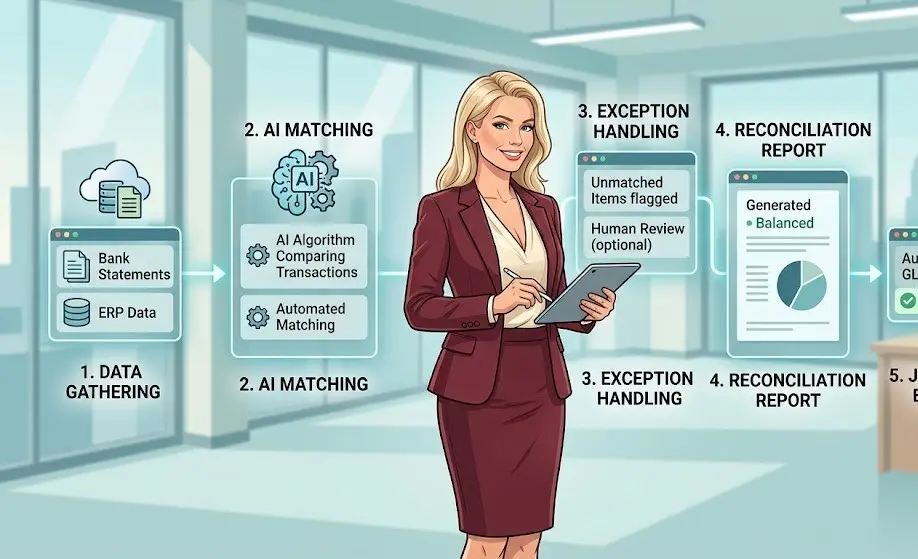
This is the AI bank reconciliation workflow I actually use: first standardising the data, then matching transactions, sorting unmatched items into likely causes, and finally drafting the bank reconciliation statement. I’ll walk through each stage with a worked example so you can see where AI saves time — and where human review is still essential.
📑 Table of Contents
- AI is genuinely fast at matching transactions by amount and date — the mechanical two-thirds of reconciliation.
- It cannot decide whether an unmatched item is a timing difference or a real error — that judgement stays with you.
- A 200-transaction reconciliation that used to take 2-3 hours typically comes down to 20-30 minutes, most of it spent on the genuinely unclear items.
- Never paste real account numbers or entity names into AI — strip them first, every time.
What Bank Reconciliation Actually Involves
A bank reconciliation statement exists because your cash book and the bank’s records almost never agree perfectly on any given day, for entirely normal reasons. A cheque you’ve issued and recorded might not have been presented at the bank yet. A customer’s payment might have cleared in the bank before you’ve recorded it in your books. The bank might have deducted charges or interest you haven’t entered yet. Occasionally, there’s simply an entry error on one side or the other.
The job of bank reconciliation is to match everything that agrees, then explain — and correctly account for — everything that doesn’t. That second part is where AI for bank reconciliation can genuinely help, and where it can also mislead you if you’re not careful. Fully automated bank reconciliation, with no human review at all, isn’t the goal here — a faster, largely automated first pass that still gets checked properly is.
So, what does that AI bank reconciliation workflow look like in practice? It starts with something that sounds basic but can save a surprising amount of time: getting the bank statement and cash book into the same structure before asking AI to match anything.
Step 1 — Format Both Sides for Matching
Bank statements and cash books rarely use the same date format, description style, or column order. Before any matching can happen, both sides need to be in a comparable structure — tedious, unglamorous work that eats time before the real bank reconciliation process even starts.
Where AI entersI paste a sample of both formats — bank statement export and cash book export, structure only, no real figures — and ask AI to write the reformatting logic once, which I can then reuse every month.
Exact prompt I useStep 2 — AI Bank Reconciliation: The First-Pass Match
Once both sides are in the same format, matching entries by date and amount is mechanical, repetitive, and exactly the kind of pattern-matching a person does slowly and a computer does fast.
Where AI entersI paste both formatted lists — anonymised, no entity name or account number — and ask AI to match on amount first, then flag everything left over.
Exact prompt I useCHECK
REQ’D
What I still check by hand
AI matches on amount and approximate date — it has no way to know if two different transactions happen to share the same amount by coincidence. Every match involving a round number or a frequently repeated amount gets a manual spot-check before I trust it.
Step 3 — Sort the unmatched items
Every unmatched item needs a reason: outstanding cheque, deposit in transit, bank charge not yet recorded, or a genuine error. Working through this list one line at a time is where most of the remaining time goes.
Where AI entersI ask AI to sort the unmatched list into likely categories based on the description text and which side it’s missing from — a triage step, not a final answer.
Exact prompt I usePro tip
Anything AI marks “Possible Error” or “Unclear” goes to the top of your manual review list — that’s AI correctly telling you it doesn’t have enough information, which is far more useful than a confident wrong guess.
Step 4 — Draft the reconciliation statement
Once every item is categorised and verified, someone still has to write up the formal reconciliation statement — bank balance, plus deposits in transit, minus outstanding cheques, adjusted for bank charges, arriving at the cash book balance.
Where AI entersWith every category confirmed by me, I ask AI to draft the statement in standard format, ready for review.
Exact prompt I use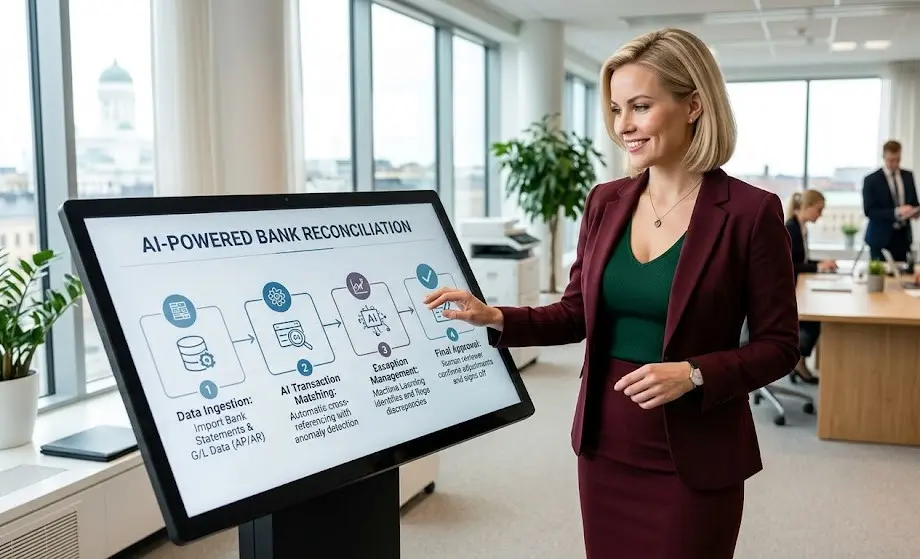
Where This Goes Wrong
There are two common mistakes to watch for when using AI for bank reconciliation. First, trusting a match just because the amount is the same. A ₹5,000 vendor payment and a ₹5,000 customer refund can look identical to AI. Always check the description and date before treating them as the same transaction. Second, overlooking recurring auto-debits. Subscriptions and standing instructions can appear on the bank statement every month in almost the same way. AI may match one to the wrong month’s cash book entry if you don’t check the dates carefully.
A Full Worked Example
Here’s what the AI for bank reconciliation using ChatGPT workflow looks like end to end, using realistic numbers. Bank statement closing balance: ₹4,82,300. Cash book closing balance: ₹4,76,850. That’s a ₹5,450 difference to explain.
After Step 2’s matching, three items were left unmatched. Step 3 sorted them: a ₹6,000 cheque issued to a vendor, present in the cash book but not yet on the bank statement — categorised as Outstanding Cheque. A ₹950 bank charge appearing on the statement but not yet in the cash book — categorised as Bank Charge Not Recorded. A ₹400 deposit recorded in the cash book on the last day of the month, not yet reflected on the bank side — categorised as Deposit in Transit.
Add: Deposit in transit: ₹400
Less: Outstanding cheque: ₹6,000
Adjusted bank balance: ₹4,76,700
Cash book balance: ₹4,76,850
Less: Bank charge not yet recorded: ₹950
Adjusted cash book balance: ₹4,75,900
Flagged: the two adjusted balances don’t match — a ₹800 gap remains, with the cash book figure lower than the bank figure.
That flagged ₹800 gap is exactly the kind of thing AI is right to surface and wrong to resolve on its own. Since the adjusted cash book balance was lower, the missing item had to be something that would increase the cash book balance — not another charge, which would only have widened the gap. Going back through the bank statement turned up a ₹800 interest credit that the bank had recorded but the cash book hadn’t. Adding it to the cash book brings the balance to ₹4,76,700, matching the adjusted bank balance exactly. That’s the whole point of the checkpoint step: AI told me something was wrong; I worked out what it was and confirmed that the correction actually balanced the bank reconciliation statement.
AI Can Make Bank Reconciliation Much Faster. It Still Can’t Decide When the Numbers Don’t Make Sense.
That’s where AI for bank reconciliation earns its place. It can handle the repetitive work — formatting the data, matching transactions, sorting unmatched items, and drafting a clean bank reconciliation statement. But it shouldn’t close the books on its own. Outstanding cheques, deposits in transit, duplicate-looking transactions, and unexplained differences still need a person’s judgement before the reconciliation is final. In my workflow, getting from three hours to around 20 minutes is the real win — not pretending the human review can be reduced to zero.