

Free Accounts Receivable & Accounts Payable Tracker Excel Template
Download the free Accounts Receivable and Payable Tracker excel with dashboard, aging reports, invoice tracking, and working capital analysis.
⭐ Free Download • No Sign-up Required • Excel 2019 & Microsoft 365 Compatible
Why Use This Accounts Receivable & Accounts Payable Tracker Excel Template?
Managing customer invoices and supplier payments is essential for maintaining healthy cash flow. This Accounts Receivable & Accounts Payable Tracker Excel Template helps you record invoices, monitor due dates, analyze aging, and track outstanding balances through an interactive dashboard. Designed for accountants, finance professionals, SMEs, and business owners, it provides a simple, ready-to-use solution for improving receivables, payables, and working capital management.

What’s Included in This Accounts Receivable & Accounts Payable Tracker Excel Template?
This ready-to-use Excel template is designed to help businesses efficiently manage customer receivables, supplier payables, and cash flow. From recording invoices to analyzing outstanding balances, every worksheet is built to simplify daily finance operations and improve decision-making.
📥 Accounts Receivable Ledger
Maintain a complete record of customer invoices, invoice dates, due dates, payments received, and outstanding balances. Easily monitor collections and identify overdue invoices.
📤 Accounts Payable Ledger
Track supplier invoices, payment due dates, outstanding liabilities, and payment status to ensure timely vendor payments and better cash flow planning.
📊 Interactive Dashboard
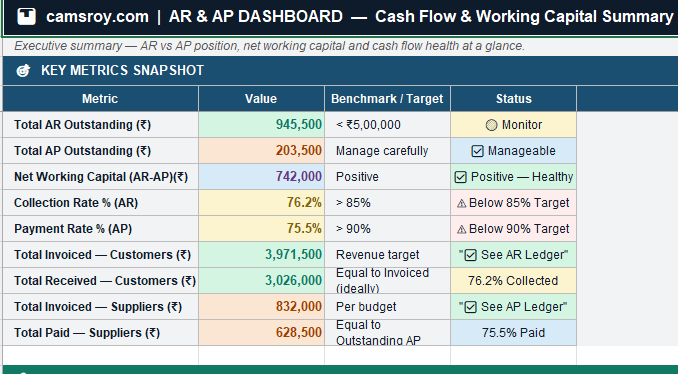
Get a real-time overview of total receivables, total payables, outstanding balances, aging summaries, and key financial metrics through easy-to-read charts and KPI cards.

⏱ Automated Aging Reports
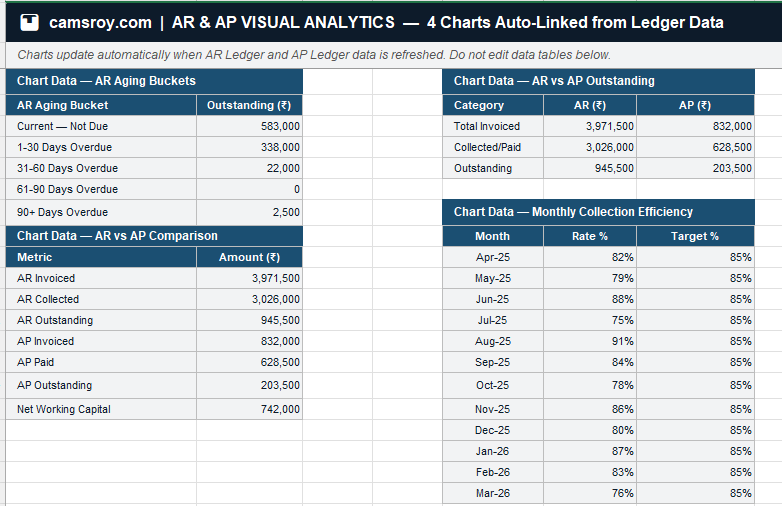
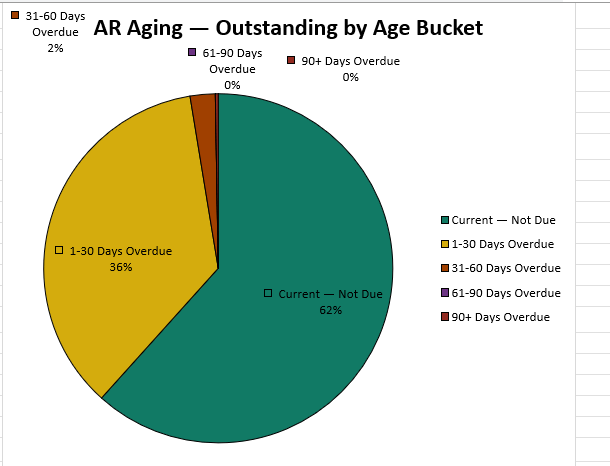
Analyze receivables and payables using aging buckets such as 0–30, 31–60, 61–90, and 90+ days, helping you prioritize collections and manage overdue payments effectively.
📈 Visual Reports & Charts
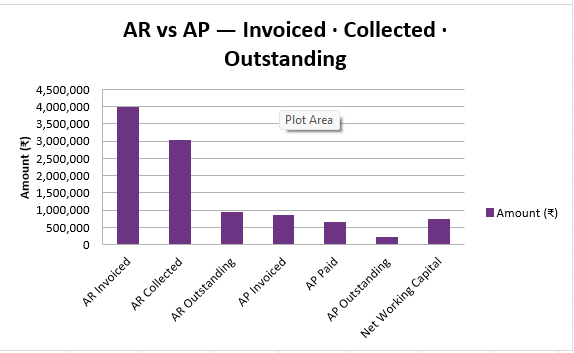
Monitor financial performance with professional charts that provide insights into outstanding invoices, payment trends, and overall working capital.
📖 User Guide
The workbook includes a dedicated instruction sheet to help you quickly set up and use the template, making it suitable for both beginners and experienced finance professionals.
How to Use the Accounts Receivable & Accounts Payable Tracker Excel Template
Start tracking customer invoices and supplier payments in just a few minutes. Follow these simple steps to keep your receivables, payables, aging reports, and dashboard up to date.
Complete the Cover Sheet
Enter your company name, financial year, credit period, and preparer details.
Update the AR Ledger
Record customer invoices, payments received, and payment dates. The template automatically calculates balances, aging, and collection status.
Update the AP Ledger
Add supplier invoices, due dates, and payments made. Outstanding balances and payment priorities are calculated automatically.
Review Aging Reports
Use the AR and AP Aging sheets to identify overdue invoices and prioritize collections or vendor payments.
Monitor the Dashboard
View key KPIs, aging summaries, charts, and net working capital in one interactive dashboard.
Customize if Required
Add more rows, include GST columns, or update the reference date while keeping formulas intact.
Pro Tip
Update your AR and AP ledgers regularly to keep the dashboard, aging reports, and charts accurate. Consistent data entry helps improve cash flow visibility, supports faster collections, and ensures timely supplier payments.

Benefits of Using an Accounts Receivable & Accounts Payable Tracker
Managing receivables and payables effectively is essential for maintaining healthy cash flow and financial stability. A dedicated AR & AP tracker helps businesses stay organized, reduce overdue invoices, and make informed financial decisions.
💰 Improve Cash Flow
Monitor outstanding receivables and upcoming supplier payments to maintain a healthy cash position and avoid liquidity issues.
⏱ Reduce Overdue Invoices
Track due dates and aging reports to quickly identify overdue customer invoices and improve collection efficiency.
🤝 Strengthen Supplier Relationships
Stay on top of vendor payment schedules to avoid late payment charges and build long-term supplier trust.

📊 Make Better Financial Decisions
Use dashboards and reports to monitor payment trends, outstanding balances, and overall working capital.
⚡ Save Time & Reduce Errors
Maintain all customer and supplier transactions in one organized workbook instead of multiple spreadsheets.
📈 Improve Working Capital Management
Balance receivables and payables more effectively to support business growth and better financial planning.

Download the Free Accounts Receivable & Accounts Payable Tracker Excel Template
Take control of your customer collections, supplier payments, and cash flow with this professionally designed Excel template. Download it for free and start managing your accounts receivable and accounts payable more efficiently.
⬇ Download Free Excel TemplateExcel Download:
Frequently Asked Questions
Everything you need to know about the Accounts Receivable and Payable Tracker Excel Template.
- Current — not yet due
- 1–30 days overdue — follow up immediately
- 31–60 days overdue — send formal demand
- 61–90 days overdue — escalate
- 90+ days overdue — consider provision for bad debt
Collection Rate = Total Payments Received ÷ Total Invoiced × 100
In this template, the collection rate is pre-built using
=IFERROR(F24/E24,0) in the AR Ledger and is automatically pulled into the Dashboard and AR Aging KPI summary. A healthy collection rate for Indian SMEs is above 85%. Anything below 75% signals a cash flow risk requiring immediate debtor follow-up.Net Working Capital = AR Outstanding − AP Outstanding
A positive NWC means you are owed more than you owe — a healthy cash position. A negative NWC means your payables exceed your receivables, which is a liquidity risk. This template calculates NWC automatically in the Dashboard and updates it in real time as you enter invoices and payments.
SUM, IF, IFERROR, MAX, TEXT — so there are no compatibility issues across versions. Google Sheets can open the file but some conditional formatting and colour-coded status cells may render differently.Still have questions? Download the template — the 📖 How to Use sheet covers every step in detail.
⬇ Download Free AR & AP Tracker Excel TemplateGet Free Excel Templates & Finance Resources
Subscribe to receive free Excel templates, finance tools, budgeting resources, and practical accounting insights delivered directly to your inbox.