

Many “Best GST Software” Lists Are Written by GST Software Vendors. Here’s How to Compare AI Tools for GST Compliance Without Taking Anyone’s Word for It.
This guide compares five widely used options on what each one publicly says it does. Then it gives you a simple test pack, built with ChatGPT, so you can check any tool yourself before you pay for it.
Search for AI tools for GST compliance and you’ll find dozens of comparison lists. Look at who published them. Several are written by the software companies themselves, and, surprise, each one ranks its own product near the top. That doesn’t make the products bad. It means you can’t use those lists to decide.
Think of this as the opposite of a “best AI tools for GST” list. It does two honest things. First, it sets out what five popular tools publicly describe, with no scores and no “winner.” Second, it shows you how to test any of them yourself using a small set of invoices with known errors. A tool that looks good in a demo and a tool that catches your actual mistakes are not always the same tool.
📑 Table of Contents
- 01What AI tools for GST compliance actually do
- 02Five tools, compared on what they publicly offer
- 03The self-test: four steps
- 04Step 1 — Build a test pack with ChatGPT
- 05Step 2 — Run each tool and compare with the answer key
- 06Step 3 — Score detection and false alarms
- 07Step 4 — Put your questions to the vendor
- 08Scoring example: three tools, one test
- 09Where these tools still need a CA
- 10Questions about AI tools for GST compliance
- Most AI tools for GST compliance do one core job: match your purchase register against GSTR-2B and sort the differences into buckets.
- The descriptions in this article are what each tool publicly states. They are not hands-on test results, and prices are left out because they change.
- The reliable way to compare tools is a seeded test: invoices with known errors, an answer key, and a score for what each tool caught and what it wrongly flagged.
- A tool that flags everything is not safe. False alarms waste time and teach your team to ignore alerts.
What AI tools for GST compliance actually do
Strip away the marketing and most AI tools for GST reconciliation do the same four things. They import your GSTR-2B from the GST portal. They match it against your purchase register. They sort the differences into buckets such as matched, partly matched, missing in books, and missing in portal. And they help you prepare the return from the result.
The “AI” part usually sits in the matching. A basic tool needs an exact match on invoice number and amount. A smarter one can match an invoice recorded as “INV/45” against “INV-0045”, or match one payment against several invoices. That is useful, but it is still matching, not tax judgement. Whether an invoice is eligible for credit at all is a decision these tools can flag but not make.
One workflow feature now matters a great deal: the Invoice Management System, or IMS. It lets you accept, reject, or hold each supplier invoice before GSTR-2B settles. A tool that ignores IMS leaves part of your process outside the software.
Five tools, compared on what they publicly offer
These descriptions come from each vendor’s own positioning and from third-party listings. Features change often, so confirm everything on the vendor’s own site before you decide. No tool here is ranked above another.
| Tool | What it publicly describes | Usually suits |
|---|---|---|
| TallyPrime | GSTR-2B import with a built-in reconciliation report that sorts entries into fully matched, partially matched, not in books, and not in portal | Businesses already running their books on Tally |
| Zoho Books | Fetches GSTR-2B from the GST portal and classifies transactions as matched, mismatched, or missing | Businesses already on the Zoho ecosystem |
| Clear (earlier ClearTax) | AI-based matching against GSTR-2A and 2B, including one-to-many and many-to-many matching, plus return filing from GSTR-1 to GSTR-9C | Teams with high invoice volumes and compliance-heavy work |
| EasyGST | Built for chartered accountants, with party-wise, invoice-wise, and consolidated reconciliation reports against accounting data | CA practices handling several clients |
| Vyapar TaxOne | GST reconciliation with mismatch detection and reports | SMEs and accountants wanting a GST-focused tool |
There is also a sixth option that needs no purchase: using ChatGPT for GST compliance matching. You export your two data sets and let it match and sort them, as shown in the earlier GST reconciliation guide on this site. That works well for a few hundred invoices. It cannot fetch GSTR-2B from the portal for you, and it leaves no built-in audit trail, which is exactly where dedicated tools earn their fee.
Pro tip
Once a tool passes the synthetic test below, run one real month that you have already reconciled by hand, with proper data-handling terms in place. You already know the right answer, so the tool has to match it. That is a far better trial than any demo.
The self-test: four steps
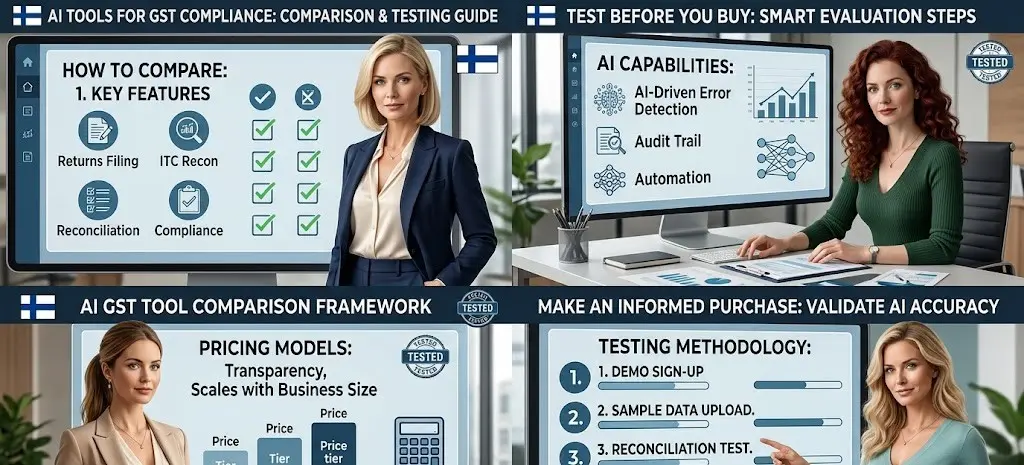
The idea is simple. Create invoices where you already know the errors, run each tool on them, and score what it finds. You build the data with ChatGPT, so no client information is ever involved. Four steps: build the test pack, run the tools, score the results, and question the vendor.
Step 1 — Build a test pack with ChatGPT
Testing a tool on real client data raises privacy questions, and you can never be fully sure what the “correct” answer was. A demo with the vendor’s own sample data proves little.
What ChatGPT buildsIt creates a small synthetic purchase register and a matching GSTR-2B, with six planted problems and an answer key. Because every GSTIN is fake, you can show the data to any vendor.
Prompt to copyCHECK
REQ’D
Check the answer key first
ChatGPT can make small mistakes in synthetic data: a “matching” invoice that quietly differs, or an answer key that lists the wrong invoice number. Before you test any tool, verify the six planted problems against the actual tables. An unchecked answer key makes every score meaningless.
Step 2 — Run each tool and compare with the answer key
In a vendor demo, the sample data is chosen to look good. Your own test pack has known problems the tool has not been tuned for, so what it catches and misses becomes visible.
Where ChatGPT helpsAfter running the tool, I paste its list of flagged items next to the answer key and let ChatGPT line them up. I still read the result myself.
Prompt for the comparisonStep 3 — Score detection and false alarms
Detection rate is how many planted problems the tool caught. Precision is how many of its flags were real. A tool can score well on one and badly on the other, and you need both.
ChatGPT’s roleIt does the simple arithmetic across tools and lays the scores in one table, so the trade-offs are easy to see.
Scoring promptStep 4 — Put your questions to the vendor
A test shows how well a tool matches. It says nothing about where your data is stored, how long it is kept, or whether it supports the IMS workflow your team needs.
How ChatGPT speeds this upIt turns your requirements into a clean list of questions to send before you sign anything.
Questions promptScoring example: three tools, one test
To show how the scoring works, here is an illustration with invented numbers. These are not results for any real product. Imagine three tools run on the same six-problem test pack.
| Tool | Problems caught | False alarms | Detection rate | Precision |
|---|---|---|---|---|
| Tool A | 5 of 6 | 1 | 83% | 83% |
| Tool B | 6 of 6 | 4 | 100% | 60% |
| Tool C | 4 of 6 | 0 | 67% | 100% |
Tool B looks best on detection, catching everything. But four of its ten flags were false alarms, so almost half of what it shows you is noise. Tool C raised no false alarms at all, but it missed two real problems. Tool A sits in the middle.
Which is “best” depends on your team. If you have a large staff to review alerts, Tool B’s thoroughness may be worth the noise. If you are a one-person practice, Tool A’s balance may suit you better. The point of the test is that you can now see the trade-off with your own eyes, instead of reading a ranking written by someone selling one of them.
Where these tools still need a CA
Three situations trip up even good tools. Reverse charge purchases. If the supplier is unregistered, nothing appears in GSTR-2B at all, because there is no supplier filing to pull from. Even when a registered supplier reports an RCM supply, it sits in its own section and you pay the tax yourself first. A tool that lists these as ordinary “missing in portal” invoices is raising a false alarm. This is why the test pack includes one. Supplier timing. A tool can tell you an invoice is missing, but not whether the supplier is late or has an error. If a supplier never files, credit may need to be reversed under Rule 37A, and that call is yours. Blocked credits. Items such as insurance on an ordinary business car can sit neatly in GSTR-2B and still be ineligible under Section 17(5). A tool matches the data. It does not decide eligibility.
Don’t Ask Which Tool Is Best. Ask Which One Catches Your Mistakes Without Burying You in False Alarms.
AI tools for GST compliance can take a lot of repetitive matching off your desk. The only way to know which one fits your work is to test it on problems you already understand. A small synthetic test pack, an answer key, and an honest score will tell you more in an afternoon than any comparison list, including this one.