

Bid Evaluation Financial Model Excel Template
Download the BESS Bid Evaluation Financial Model Excel Template to compare project bids, evaluate commercial proposals, and support investment decisions.
What Is a Bid Evaluation Financial Model?
A Bid Evaluation Financial Model is an Excel-based tool used to compare and evaluate competing project bids using standardized financial, commercial, and technical criteria. It helps organizations assess vendor proposals objectively and select the most suitable bid.
The model analyzes project costs, financing, cash flows, profitability, and investment returns to support transparent, data-driven procurement decisions. It is widely used for infrastructure, renewable energy, EPC, and other capital-intensive projects.

Key Features of the Bid Evaluation Financial Model Excel Template
Explore the powerful features designed to simplify bid evaluation, improve financial analysis, and support confident project decisions.
Interactive Dashboard
Monitor key financial metrics and bid comparison results.
Financial Analysis
Evaluate project costs, cash flows, profitability, and returns.
Bid Comparison
Compare multiple vendor bids using standardized assumptions.
Sensitivity Analysis
Assess the impact of key financial assumptions on project outcomes.
Debt & Equity Analysis
Review financing structures and repayment scenarios.
Scenario Planning
Test different commercial and technical assumptions.
Automated Calculations
Reduce manual work with built-in formulas and linked calculations.
Excel Compatible
Fully editable and compatible with Microsoft Excel.
Benefits of the Bid Evaluation Financial Model Excel Template
Make faster, data-driven procurement decisions with a structured Excel template that improves accuracy, transparency, and financial analysis.
Improve Decision-Making
Compare multiple bids using standardized financial and commercial evaluation criteria.
Save Time
Automate calculations and eliminate repetitive manual analysis during bid evaluation.
Increase Accuracy
Reduce calculation errors with built-in formulas, linked worksheets, and structured inputs.
Enhance Transparency
Apply consistent evaluation methods to ensure objective and auditable procurement decisions.
Professional Reporting
Create lender-ready and management-friendly financial evaluations with confidence.
Support Better Investments
Evaluate project viability, profitability, and financial risks before selecting the winning bid.

Preview the Bid Evaluation Financial Model Excel Template
Explore the professionally designed worksheets included in the Bid Evaluation Financial Model Excel Template before downloading.
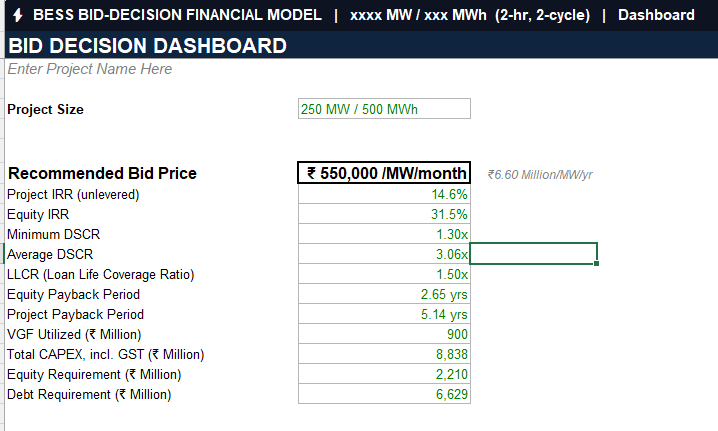
Interactive Dashboard
Track key financial metrics, project performance, and bid comparison results from a centralized dashboard.
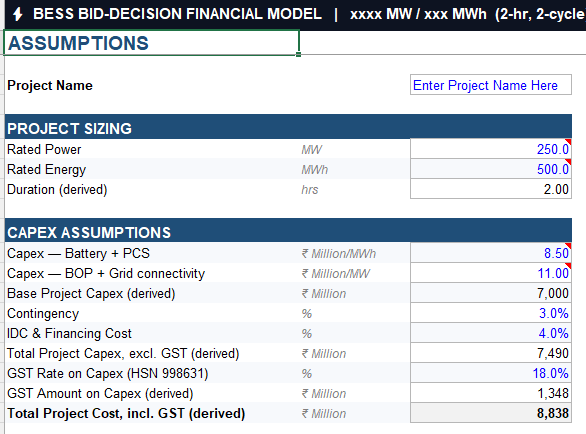
Structured Assumptions
Modify financial, commercial, and technical assumptions using dedicated input worksheets.
Financial Analysis
Analyze project costs, cash flows, profitability, investment returns, and financing scenarios.
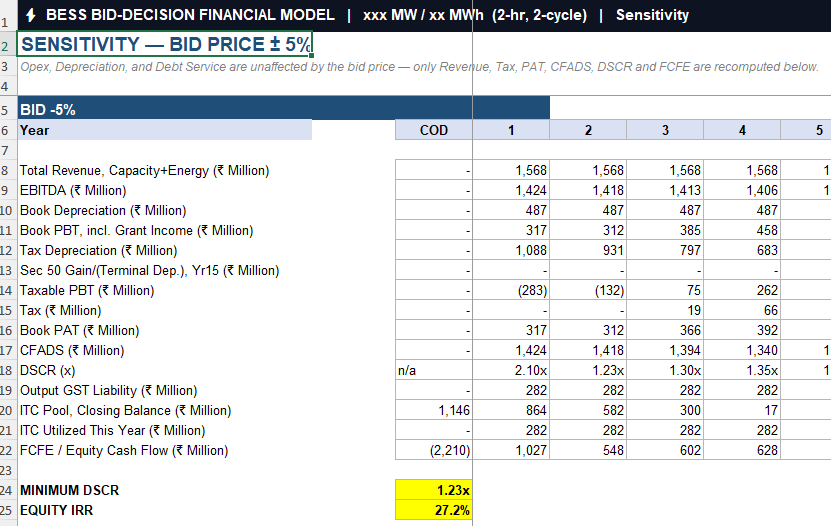
Sensitivity Analysis
Evaluate how changes in key assumptions affect project viability and financial performance.

Workbook preview showing professionally designed worksheets, dashboards, financial analysis, and automated bid evaluation tools included in the Excel template.

What’s Included in the Bid Evaluation Financial Model Excel Template?
The workbook includes professionally designed worksheets with automated calculations to help you evaluate project bids, compare financial proposals, and support better investment decisions.
Workbook Sheets
- ✔ Dashboard
- ✔ Instructions
- ✔ Assumptions
- ✔ Bid Comparison
- ✔ Revenue Analysis
- ✔ Cost Analysis
Financial Analysis
- ✔ Cash Flow Statement
- ✔ Debt Schedule
- ✔ Financing Structure
- ✔ Profitability Analysis
- ✔ Investment Returns
- ✔ Scenario Analysis
Professional Features
- ✔ Fully Editable Excel Workbook
- ✔ Automated Formulas
- ✔ Interactive Dashboard
- ✔ Microsoft Excel Compatible
- ✔ Professional Formatting
- ✔ Ready for Project Evaluation


How to Use the Bid Evaluation Financial Model Excel Template
Follow these simple steps to configure the model, evaluate project bids, and determine the minimum bid price using Excel Goal Seek.
Enter Assumptions
Update the blue input cells in the Assumptions and Degradation Curve worksheets with your project data.
Validate the Model
Confirm all model integrity checks display OK and the Balance Sheet check equals zero before proceeding.
Run Goal Seek
Use Excel’s Goal Seek to determine the required bid price based on the target DSCR, Equity IRR, or Project IRR.
Review Results
Select the highest calculated bid price and review the sensitivity analysis to ensure an adequate safety margin.
Recalculate & Verify
Press F9 after updating assumptions and verify all integrity checks before using the final results.

Frequently Asked Questions
Get Free Excel Templates & Finance Resources
Subscribe to receive the latest Excel templates, financial models, accounting tools, and practical resources delivered to your inbox.






Disclaimer
This Excel template is provided for educational and informational purposes only. While reasonable efforts have been made to ensure the accuracy of formulas and calculations, users should independently verify all assumptions, inputs, and outputs before using the template for financial, commercial, tax, accounting, procurement, or investment decisions. CamsRoy shall not be liable for any loss or damages arising from the use of this template.