

Startup MIS Dashboard Excel Template
Free Startup MIS Dashboard Excel Template for financial reporting, cash flow management, budget vs actual analysis, and working capital monitoring.
✓ 11 Linked Worksheets • ✓ Cash Flow Dashboard • ✓ Budget vs Actual Tracking • ✓ Investor Reporting Ready
Track Revenue, Gross Profit, EBITDA, Net Profit, Operating Cash Flow, and Free Cash Flow in a single Excel workbook designed for monthly management reporting.
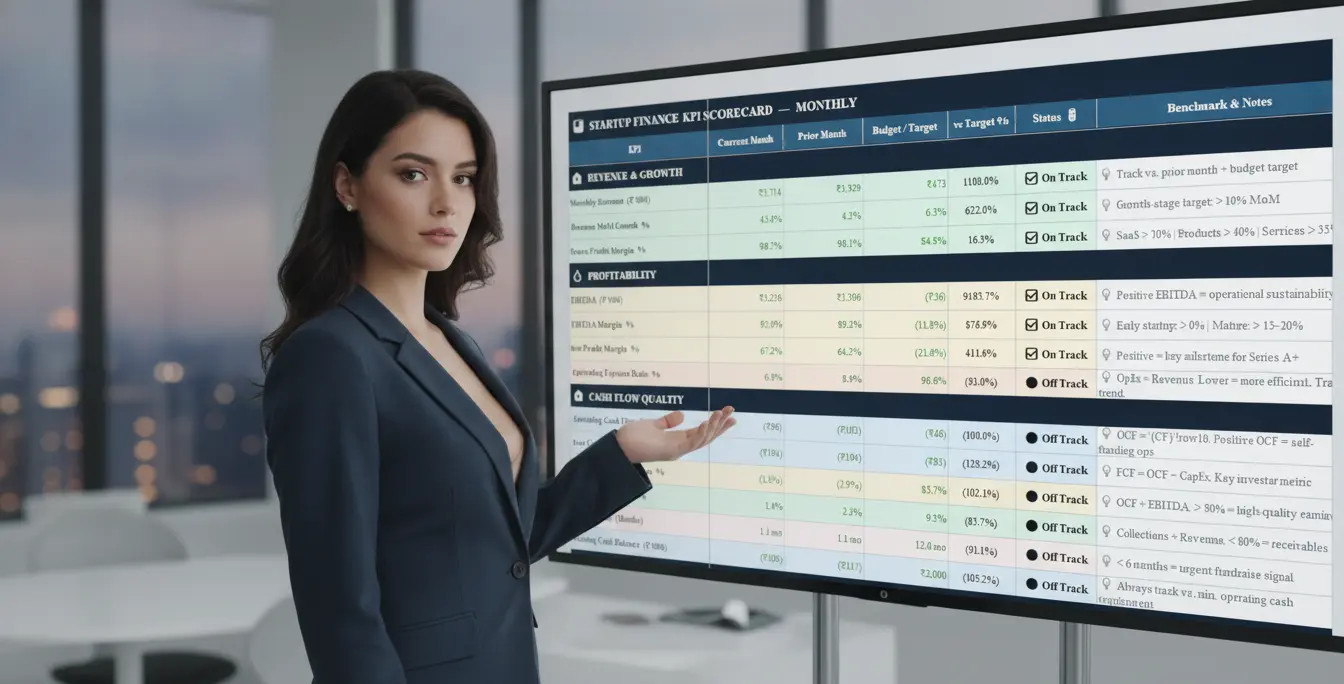
Compare actual performance against budgets, identify variances, and monitor key financial metrics with automated KPI scorecards and trend tracking.
Monitor DSO, DPO, Cash Conversion Cycle, Cash Balance, Runway, and Working Capital KPIs to improve liquidity and support business growth.

The Startup MIS Dashboard Excel Template is a free, ready-to-use financial reporting workbook designed for startups, SMEs, consultants, and finance professionals. Enter your monthly numbers in a single input sheet, and the template automatically generates your P&L, cash flow statement, working capital metrics, KPI tracker, and board-ready management dashboard.
Whether you’re preparing monthly MIS reports, monitoring cash flow, tracking business performance, or presenting results to investors and lenders, this template helps you consolidate critical financial information in one place.

📊 Executive Dashboard
Monitor Revenue, EBITDA, Net Profit, Cash Flow, Working Capital, and key business KPIs from a single management dashboard.
💰 P&L Reporting
Track Revenue, Gross Profit, EBITDA, Operating Profit, and Net Profit with monthly trend analysis.
🏦 Cash Flow Dashboard
Monitor Operating Cash Flow (OCF), Free Cash Flow (FCFF), Cash Balance, and Cash Runway.
📈 Budget vs Actual Analysis
Compare actual performance against targets and identify key business variances.
🔄 Working Capital Tracker
Track DSO, DPO, Cash Conversion Cycle (CCC), Collection Efficiency, and liquidity ratios.
📋 KPI & Management Reporting
Monitor 30+ management KPIs with automated performance indicators and trend analysis.
Why This MIS Dashboard Is Different
Most free Excel templates stop at a simple P&L report. The Startup MIS Dashboard Excel Template goes further by combining financial reporting, cash flow analysis, working capital tracking, KPI monitoring, and management reporting in a single workbook.
The template is built around the metrics that investors, lenders, boards, and fractional CFOs actually review each month — including DSO, Cash Conversion Cycle (CCC), EBITDA Cash Conversion, Free Cash Flow (FCFF), Cash Runway, and LTV:CAC.
Instead of maintaining multiple spreadsheets, enter your monthly data once and automatically generate a complete management reporting package.
Maintained, Not Abandoned
This template is actively maintained and updated. Future enhancements, corrections, and new versions will be published on this page, ensuring you always have access to the latest release.

Who Should Use This Startup MIS Dashboard Template?
Designed for founders, finance professionals, consultants, and business owners who need structured monthly reporting, cash flow visibility, and investor-ready management information without investing in expensive software.
🚀 Startup Founders
Monitor revenue growth, profitability, cash runway, and key business metrics from a single dashboard.
🏢 SME Business Owners
Track business performance, working capital, and budget variances to improve decision-making.
💼 Finance Managers
Prepare monthly MIS reports, management dashboards, and performance reviews efficiently.

📊 Consultants & Fractional CFOs
Deliver professional reporting solutions to clients using a ready-to-use reporting framework.
🎓 Chartered Accountants
Provide value-added MIS reporting, KPI monitoring, and financial analysis services to clients.
If you’re currently sharing only a P&L report from Tally, Zoho Books, or Excel, this template provides a much more complete view of business performance by combining profitability, cash flow, working capital, and management KPIs in one report.
Key Metrics Tracked in the Startup MIS Dashboard
Most free Excel templates stop at revenue and expenses. This Startup MIS Dashboard Excel Template goes further by tracking the financial, operational, and cash flow metrics that founders, finance teams, lenders, and investors actually use to evaluate business performance.
📈 Profitability Metrics
- Revenue Growth
- Gross Profit & Gross Margin
- EBITDA & EBITDA Margin
- Net Profit & Net Profit Margin
- EBITDA Cash Conversion %
💰 Cash Flow & Liquidity
- Operating Cash Flow (OCF)
- Free Cash Flow (FCFF)
- Closing Cash Balance
- Cash Burn Rate
- Cash Runway
🔄 Working Capital Metrics
- Days Sales Outstanding (DSO)
- Days Payable Outstanding (DPO)
- Days Inventory Outstanding (DIO)
- Cash Conversion Cycle (CCC)
- Collection Efficiency %
📊 Budget vs Actual Analysis
- Revenue Variance
- EBITDA Variance
- Cash Flow Variance
- KPI Achievement %
- Monthly Performance Tracking
🚀 Startup & Growth Metrics
- Customer Acquisition Cost (CAC)
- Lifetime Value (LTV)
- LTV:CAC Ratio
- Burn Multiple
- Revenue Per Employee
🏢 Financial Health Indicators
- Current Ratio
- Quick Ratio
- Working Capital %
- Employee Productivity Metrics
- Headcount Trends
By consolidating these metrics into a single dashboard, the template provides a complete view of profitability, cash flow, liquidity, growth, and operational efficiency without requiring manual calculations or multiple spreadsheets.

Ready to Simplify Your Monthly MIS Reporting?
Download the Startup MIS Dashboard Excel Template and build your first management dashboard in under 20 minutes. Track profitability, cash flow, working capital, budget performance, and key business KPIs in one integrated workbook.
How to Use This Template — Quick Start
Get your first management dashboard ready in under 20 minutes by following these simple steps.
Download and Open the File
Opens in Excel 2016 or later, Excel for Mac, or Google Sheets (with minor formatting differences).
Set Up Your Company Details
Open the Raw Data Input sheet and fill in company name, financial year, and currency in the setup section.
Enter Your Monthly Actuals
Fill in revenue, expenses, cash flow, HR, and working capital figures for the current month. Input cells are marked in blue.
Set Your Annual Budget Once
Go to the Budget sheet and enter yearly targets. This is a once-per-financial-year task.
Set the Current Month Selector
Update the month selector in the Budget sheet so the KPI Tracker and Dashboard pull the correct comparison month.
Review Your Dashboard
Open the Dashboard sheet. Scorecards, Actual vs Budget analysis, and charts update automatically.
This template uses formulas throughout. Avoid pasting data as values over formula cells, or downstream sheets will stop updating. For a static snapshot to share with investors or management, use File → Save As Copy first.

Need a Detailed Walkthrough?
This template is designed to work out of the box, but understanding the reporting logic behind each worksheet will help you get the most value from it.
A detailed companion guide covering workbook setup, dashboard interpretation, KPI definitions, common mistakes, and sheet-by-sheet instructions is currently being prepared.
Complete Startup MIS Dashboard Guide
Learn how to build monthly MIS reports, interpret key metrics, track cash flow, monitor working capital, and create investor-ready management reports using this template.
Frequently Asked Questions
Explore More Free Finance Templates
Discover additional Excel templates for financial planning, cash flow management, business analysis, and decision-making.
ROI Excel Template
Calculate return on investment, payback period, and project profitability with a simple Excel model.
View Template →SME Financial Health Dashboard
Monitor profitability, liquidity, solvency, and key financial health indicators in one dashboard.
View Template →Advanced SME Financial Model
Build forecasts, scenario analysis, business valuations, and funding plans using a comprehensive model.
View Template →13 Week Cash Flow Forecast
Forecast cash inflows, outflows, and liquidity position with a rolling 13-week cash flow model.
View Template →
Ready to Build Professional MIS Reports?
Download the Startup MIS Dashboard Excel Template and start tracking profitability, cash flow, working capital, budget performance, and management KPIs in one integrated workbook.
Disclaimer
This template is provided for educational and informational purposes only. Users should review outputs and adapt assumptions to their specific business requirements before making financial decisions.