

Product Pricing Excel Template – Calculate the Right Selling Price & Profit Margin
Build profitable product prices with cost-plus, markup, target profit and value-based pricing models. Compare pricing scenarios, analyze price sensitivity and identify a practical selling price in Excel.
What Is Product Pricing?
Product pricing is the process of determining how much to charge customers for a product based on factors such as product cost, desired profit margin, market conditions, customer value, competition, and demand.
A good pricing strategy aims to set a selling price that is competitive while generating a sustainable profit.

How to Price a Product
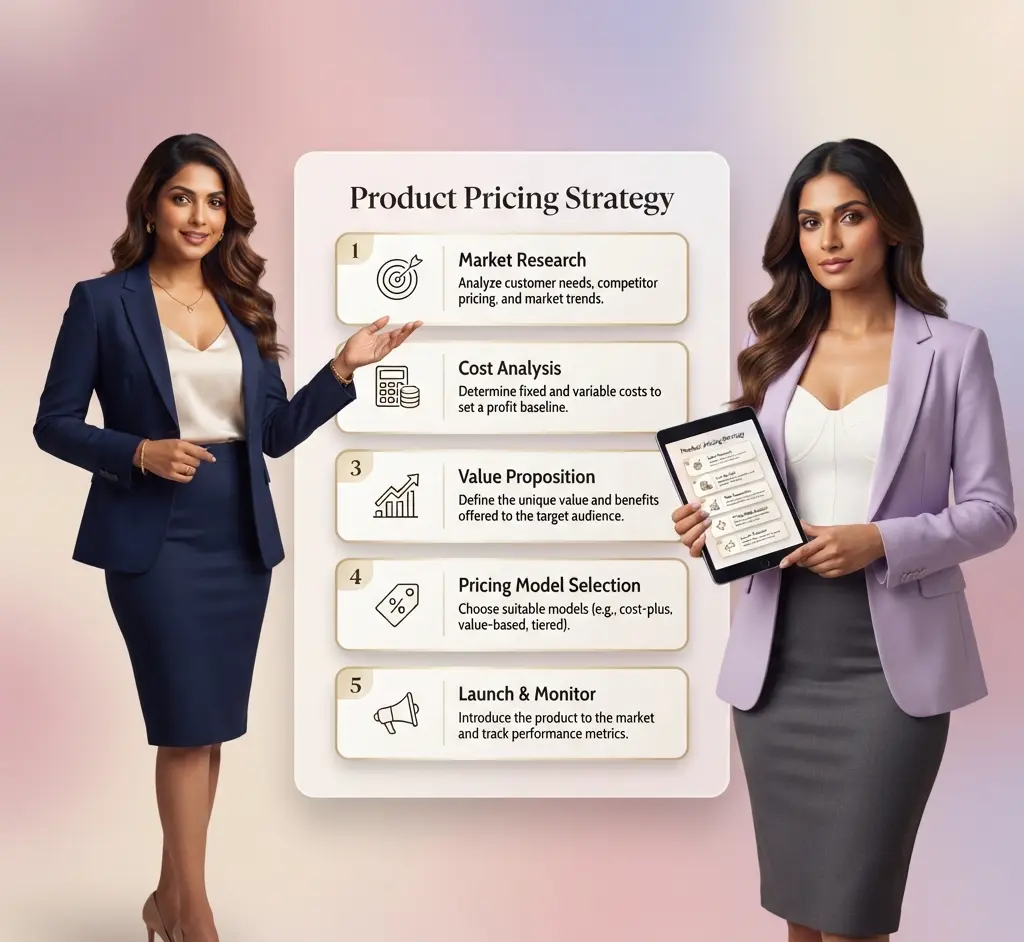
To price a product, calculate its cost per unit, set a target profit margin or markup, consider market and customer conditions, and test whether the resulting selling price is commercially viable. Product pricing should balance profitability with customer value, competition, demand, and the price customers are willing to pay.
A practical product pricing strategy generally involves the following steps:
- Calculate the product cost. Determine the variable cost per unit and allocate relevant fixed or overhead costs to understand the total cost associated with selling the product.
- Set your target profit margin or markup. Decide how much profit you want to earn and calculate the selling price required to achieve your target.
- Consider market conditions. Compare your calculated selling price with competitor prices, customer expectations, product positioning, and perceived customer value.
- Establish a practical price range. Identify a minimum viable price, target selling price, and reasonable market ceiling.
- Test different pricing scenarios. Evaluate how changes in price may affect sales volume, revenue, contribution margin, and overall profitability.
The right product price is not necessarily the highest price a customer may accept. It is a price that provides a sustainable profit while remaining competitive and appropriate for the product’s target market.

Product Pricing Methods
There is no single method that works for every product. Businesses can use different product pricing methods depending on their cost structure, profit objectives, market conditions, and the value customers place on the product.
The most commonly used approaches include cost-plus pricing, markup pricing, target profit pricing, and value-based pricing.
Cost-Plus Pricing
Cost-plus pricing calculates the selling price by adding a desired profit margin to the product’s cost. It provides a straightforward way to ensure that the selling price covers costs while achieving a defined margin.
Markup Pricing
Markup pricing applies a percentage increase to the product cost to determine the selling price. Markup is calculated on cost, whereas profit margin is calculated as a percentage of the selling price.

Target Profit Pricing
Target profit pricing works backward from a desired profit level to determine the selling price required to achieve that objective. This approach is useful when a business has a specific profitability target for each product.
Value-Based Pricing
Value-based pricing sets the selling price according to the value perceived by the customer rather than relying only on product cost. Factors such as product benefits, differentiation, brand positioning, customer willingness to pay, and competing alternatives can influence the price.
In practice, businesses may combine these methods rather than relying on a single pricing approach. Cost-based calculations can establish a pricing floor, while market conditions and customer value can help determine the final selling price.
Product Pricing Formulas & Examples
Product pricing formulas help translate your cost and profit objectives into a practical selling price. The appropriate formula depends on whether your target is expressed as a profit margin, markup, or a specific after-tax profit objective.
Selling Price Based on Profit Margin
When the desired profit is expressed as a percentage of the selling price, use the following formula:
Selling Price Based on Markup
When the desired profit is expressed as a percentage of product cost, the selling price can be calculated using:
Target After-Tax Profit Pricing
If you want to achieve a specific after-tax profit per unit, the required pre-tax profit can be considered together with the applicable tax rate to determine the required selling price.
Example: Margin vs. Markup
Suppose a product has a cost of ₹600 and you want a 30% target profit margin. The required selling price is:
₹600 ÷ (1 − 30%) = ₹857.14
If you instead apply a 30% markup to the same ₹600 cost, the selling price would be ₹780.
This demonstrates why markup and profit margin are not the same measure.

What This Product Pricing Template Includes
The Product Pricing Excel calculator brings multiple pricing approaches into one structured workbook, allowing you to calculate, compare, and evaluate selling prices for different products. It is designed to help businesses move from basic cost calculations to a more informed pricing decision.
From calculating a cost-based price to testing market positioning and profitability, the template provides a practical framework for evaluating different pricing scenarios before setting a final selling price.
Cost-Plus Pricing
Calculate selling prices based on target contribution margin, markup, and product cost. The template shows how different pricing approaches affect the resulting selling price and profitability.
Target Profit Pricing
Work backward from a desired after-tax profit per unit to estimate the selling price required to achieve your target, based on the assumptions entered in the workbook.
Value-Based Pricing
Set a practical pricing range using a price floor, target price, and market ceiling. This helps compare cost-based pricing with the price the market may reasonably support.

Price Sensitivity Analysis
Test different selling-price scenarios and evaluate their potential impact on sales volume, revenue, contribution margin, and profit.
Pricing Dashboard
Compare pricing outcomes across products and pricing methods in a consolidated dashboard, making it easier to identify pricing differences and review the overall results.
Multiple Product Analysis
The workbook can be used to evaluate up to five products, allowing you to compare pricing assumptions and results within the same file.
Tip: The template is intended as a pricing analysis and planning tool. The final selling price should also consider actual market research, customer demand, competitive conditions, taxes, discounts, and other business-specific factors.

How to Use the Product Pricing Excel Template
Using the Product Pricing Excel Template is straightforward. Enter your product costs, pricing assumptions, and market inputs, and the workbook calculates different pricing scenarios for comparison.
- Review the Setup sheet. Enter your target profit margin, markup, tax rate, trade discount, pricing assumptions, and other relevant inputs.
- Enter product costs and volumes. Add the product name, variable cost per unit, allocated fixed costs, and expected sales volume for each product.
- Review cost-based pricing. Use the cost-plus and markup calculations to determine selling prices based on your required profitability.
- Evaluate value-based pricing. Enter the relevant market price range, including the pricing floor, target price, and market ceiling, to assess a practical value-based price.
- Analyze price sensitivity. Test different selling prices and review the potential impact on sales volume, revenue, contribution, and profitability.
- Compare the results on the dashboard. Use the summary view to compare pricing approaches and identify a suitable price for further evaluation.
Tip: The calculated price should be treated as a pricing decision-support estimate. Consider competitor pricing, customer willingness to pay, market demand, and actual business costs before finalizing the selling price.
Product Pricing vs. Markup vs. Profit Margin
Markup and profit margin are related but are not the same measure. Understanding the difference is important when setting product prices because using the wrong percentage can result in a selling price that does not meet the intended profitability target.
Product Pricing
Product pricing is the broader process of determining the selling price by considering costs, profit objectives, market conditions, customer value, competition, and expected demand.
Markup
Markup is the percentage added to the product cost to determine the selling price. It is calculated as a percentage of cost.
Profit Margin
Profit margin is the percentage of the selling price that represents profit after accounting for the relevant costs. It is calculated as a percentage of selling price.
If a product costs ₹600, applying a 30% markup results in a selling price of ₹780. The resulting profit margin is approximately 23.08%, not 30%.
This distinction becomes particularly important when comparing cost-plus pricing, target-margin pricing, and market-based pricing decisions. Understanding whether a percentage represents markup or profit margin helps ensure that pricing calculations are aligned with the intended profitability target.

Download the Product Pricing Excel Template
Calculate, compare, and evaluate product selling prices using multiple pricing approaches in one structured Excel workbook. Build pricing scenarios based on costs, profit objectives, market value, and expected demand.
- Calculate cost-plus and markup-based selling prices.
- Evaluate target profit margin and after-tax profit scenarios.
- Compare value-based pricing against market assumptions.
- Analyze price sensitivity and potential profitability.
- Evaluate pricing across multiple products.
- Review key pricing results through the dashboard.
For educational, analytical, and planning purposes only. Results depend on the assumptions and data entered and should be independently reviewed before making commercial pricing decisions.
Frequently Asked Questions About Product Pricing

Explore More Excel Templates for Finance & Business
Take your finance and business analysis further with our collection of free Excel templates, financial models, and practical financial tools. Each template is built around a specific business or finance use case, helping you structure information, simplify calculations, evaluate results, and make better-informed decisions.
Explore resources for financial statements, financial ratios, project finance, budgeting, forecasting, cash flow analysis, loan calculations, investment evaluation, and business planning. Whether you are analyzing company performance, assessing a project, reviewing an investment opportunity, or preparing a financial plan, these ready-to-use Excel resources give you a practical foundation that can be adapted to your own requirements.
SME Financial Excel Templates & Utilities
- ROI Excel Template (Free Download) – Financial Model
- SME Financial Dashboard Excel Template (Free KPI Tracker)
- Free Financial Model Excel Template -Track Your Business KPI
- 13 Week Cash Flow Forecast Excel Template – Track Cash Weekly
- Free Startup MIS Dashboard Excel Template with KPI Dashboard
- Budget vs Actual Excel Template (Free Download) for SMEs
- Accounts Receivable and Payable Tracker Excel Template – Free
- Payroll Salary Register Excel Template (Free Download)
- Bid Evaluation Financial Model Excel Template (Free Download)
- BESS Financial Model Excel Template – Free Project Finance Model
- Free DSCR Debt Sculpting Excel Template | Project Finance Model
- Inventory Management Excel Template – Free Download
- Break Even Analysis Excel Template – Free Excel Download
- Monthly Financial Statement Excel Template with Ratios
- Financial Ratio Analysis Excel Template – 28+ Ratios
- Vendor Financial Due Diligence Excel Template | Risk Assessment
- GST Invoice Template Excel – Automatic GST Invoice Generator

SUBSCRIBE FOR NEW FINANCE TEMPLATES, TOOLS & INSIGHTS
Disclaimer
This Product Pricing Excel Template is provided for educational, analytical and business planning purposes only. The template uses user-entered product costs, fixed or allocated costs, expected sales volumes, pricing assumptions, profit targets, market pricing information and other inputs to calculate and present indicative selling prices and pricing scenarios.
The pricing calculations, profitability estimates, price sensitivity analysis and other information generated by the template are based on the assumptions and data entered by the user and may not reflect actual market conditions or future business performance. Users should independently verify product costs, allocated overheads, expected sales volumes, applicable taxes, discounts, market prices, customer demand and other relevant assumptions before relying on the results. The template does not constitute financial, accounting, investment, tax, legal or professional advice, and users remain responsible for evaluating the suitability of any pricing decision for their specific business circumstances.