Stop Generic Prompts, Get Elite Results from ChatGPT in Minutes
I still remember a day when a client’s ops lead pinged me “We have got thirty minutes before the board call, can ChatGPT pull a clean SOP from these messy notes?” My first pass was passable but not board ready. The second, using a tight five-step system I’ve refined across dozens of projects was crisp enough to ship without edits.
In my experience, the gap between “okay” and “we can send this” is not about the model; it is about the signal you feed it. This guide shares the exact system (and templates) I use to turn vague asks into publish-ready outputs in minutes. If you work in finance, accounting, taxation, operations, marketing, support, or education, this will save you hours every week.
Why generic prompts fail (and what pros do differently)
Generic prompts force the model to guess your goal, audience, and structure. Guessing leads to bland copy, fuzzy logic, and extra editing. Pros flip the script: they constrain the task, ground the content, and force a format that pastes cleanly into a doc, deck, CMS, or ticketing tool.
What I have learned:
- Clear roles and inputs beat poetic adjectives.
- Small style examples steer tone better than long instructions.
- A one-line critic pass at the end quietly doubles quality.
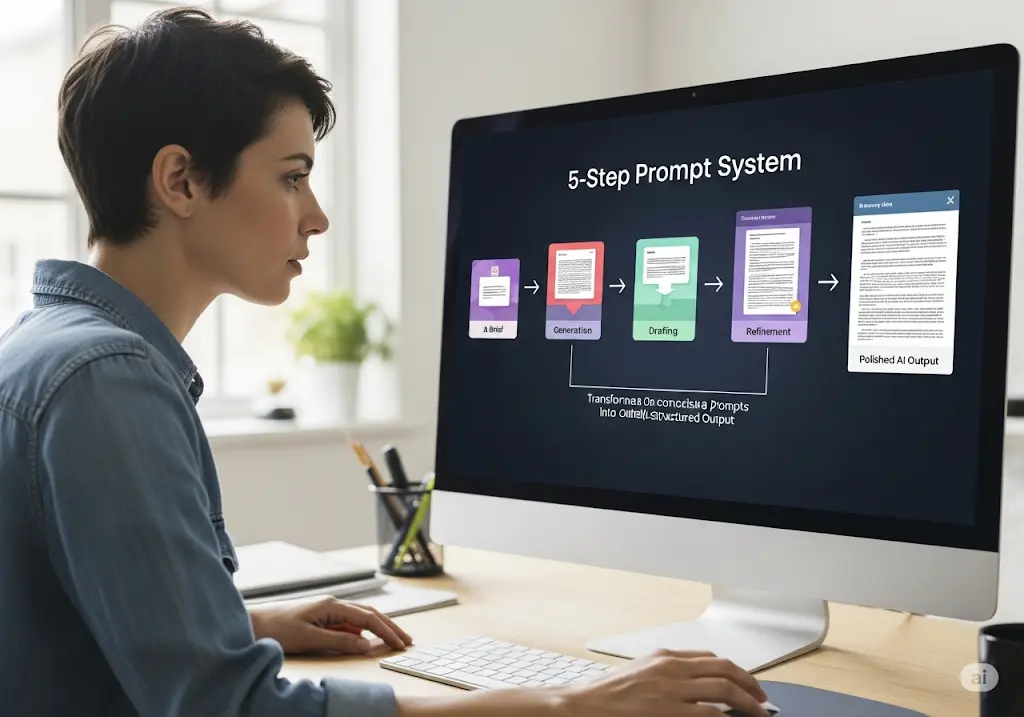
The 5-Step Prompt System: BRIEF → CONTEXT → CONSTRAINTS → EXAMPLES → OUTPUT (+ CRITIC)
You can memorize 5-step prompt system as B-C-C-E-O (+C). It mirrors how professionals write creative briefs—compressed into one prompt.

1) BRIEF — what you need and for whom
State the job and audience in one sentence.
Example: “Draft a vendor-onboarding SOP for a 50-person company, written for non-technical managers.”
2) CONTEXT — what the model should know
Give only the inputs you want it to use—snippets, bullets, short data. Think two to five tight items. (I’ve noticed “dump everything” creates drift.)
3) CONSTRAINTS — length, tone, rules, banned phrases
Be specific and short.
Example: “Plain English, 200–220 words, avoid ‘revolutionary’ and ‘game-changing’.”
4) EXAMPLES — a tiny style sample
Paste 2–3 lines of the tone/structure you want. Small examples steer better than long adjectives.
5) OUTPUT — exact structure or data shape
Ask for tables, numbered sections, or JSON. Structure saves the most editing time.
+ CRITIC (Fast QA):
Add at the end: “Critic pass: list 5 ways this could be clearer, more accurate, or better structured, then revise.”
In my experience, this fixes 80% of what you would manually change.
Copy-paste templates (by role)
Use these as building blocks—swap your data and style lines.
A) Finance & Accounting
Month-end variance notes (FP&A)
Brief: You are my FP&A analyst.
Context: P&L current vs prior CSV; cost-centre mapping; notes pasted below.
Constraints: 200–220 words; plain English; no buzzwords.
Examples: “Revenue ↑ 12% (₹X): reseller ramp in West.”
Output: 8-row markdown table (amount + %) + 5 bullets (each with 1 action).
Critic: List 5 improvements; revise.
Audit workpaper summary
Brief: You are an audit senior.
Context: Testing results pasted below.
Constraints: ≤500 words; neutral tone.
Output: H3 sections — Control Objective, Procedure, Exceptions, Impact, Management Response.
Critic: Check for clarity and missing controls; revise.
Tax/circular explainer (client-safe)
Brief: You are a tax advisor writing to SMB owners.
Context: Excerpts pasted below from official circulars.
Constraints: 400–500 words; no legalese; add “What to do now” steps.
Output: Two short sections + 4-point checklist.
Critic: Flag ambiguous lines; rewrite for clarity.
B) Operations & Productivity
Meeting → action plan
Brief: Chief-of-staff tone.
Context: Raw notes pasted below.
Constraints: ≤180 words total.
Output: 4 sections—Decisions, Owners, Deadlines, Risks (≤5 bullets each).
Critic: Spot missing owners/deadlines; fix.
SOP from messy notes
Brief: Ops writer for non-technical readers.
Context: Bullet notes pasted below.
Constraints: Plain English; short sentences; no jargon.
Output: Purpose, Scope, Roles, Numbered Steps, Controls (checklist), Exceptions.
Critic: Check steps for gaps; reorder for flow.
Email triage
Brief: Executive assistant.
Context: Inbox snippets pasted below.
Constraints: Concise replies; no filler.
Output: Urgent / Important / Informational + draft replies for Urgent; 3 suggested follow-ups.
Critic: Remove redundant lines; tighten.
C) Marketing & Content
Webinar → content system
Brief: Content strategist for SMB audience.
Context: Transcript paste; target pain points; product positioning notes.
Constraints: Helpful, specific; avoid hype terms.
Output: 1,200-word blog outline (H2/H3s), 3 LinkedIn posts (≤120 words), 6 short-video hooks.
Critic: Sharpen headlines/hooks; revise.
Product description (PDP)
Brief: E-commerce copywriter.
Context: Product features; target persona; use cases.
Constraints: 120–150 words; 4 benefit bullets; 2 FAQs; avoid “best-in-class.”
Output: H2 title + paragraph + bullets + FAQs.
Critic: Tighten verbs; remove fluff.
D) Support & Education
Ticket → KB article
Brief: Support writer.
Context: Ticket log + resolution steps.
Constraints: ≤900 words; no internal jargon.
Output: Steps (with screenshot placeholders), “common errors” list.
Critic: Check step order and error coverage.
Study guide (fast exam prep)
Brief: Tutor.
Context: Chapter notes pasted below.
Constraints: Concise, exam-focused.
Output: Key concepts, formulas, 10 flashcards, 5 MCQs with answers.
Critic: Fill obvious gaps in coverage.
Mini-stories from the field (so you can see the lift)
- Month-end reality check: We used the FP&A template above with a retail client. The first run took ~20 minutes; by week three it dropped to ~12. The critic pass removed most tone edits, and the CFO started forwarding the summary as-is.
- Policy drafting under pressure: A new auditor was due in five days. Using the SOP template, we produced a clean AP policy in one sitting, then asked the model for a board-friendly 1-pager. The board loved the clarity (short sentences, numbered steps).
- Marketing repurpose at scale: One webinar transcript became a blog outline, three LinkedIn posts, and six hooks in under an hour. The hooks drove the most clicks because we enforced format and length up-front.
What I have noticed, when you force structure and show a tiny example, you spend time on judgment, not rewriting.
The 10-minute pro workflow (repeat weekly)
- Outline first, then draft. Ask for an outline with headings; approve; then say “Write section by section.”
- Paste a tiny style line. Two sentences beat five adjectives.
- Force structure. Tables, numbered steps, or JSON—whatever pastes cleanly.
- Ground selectively. When accuracy matters, paste short authoritative snippets and instruct: “Quote only from these.”
- Run the critic pass. Have the model list 5 improvements, then revise.
- Save the winner. Turn your best prompt into a reusable template.
Tools that I use: ChatGPT for drafting; Google Docs or Notion for templates; Sheets for data; Zapier/Make when I want outputs routed to docs, email, or a CMS. (You don’t need automations on day one to get the prompt right first.)
Common mistakes (and fast fixes)
- Vague asks → Add constraints and a style sample.
- Messy structure → Demand tables or numbered sections.
- Hallucinations → Paste snippets and say “quote only from these.”
- One-shot prompting → Go outline → draft → critic, not all-at-once.
- Context dumping → Provide only the sections you want referenced.
- Trying to do everything with one model → Pick by job (see refresher below), then combine.
Which model when? (30-second refresher)
- Grok when the answer depends on today’s info (news, circulars, pricing).
- Claude when the output must be defensible (policies, audits, careful reasoning).
- GPT-5 when you need a working workflow (scripts, tables, dashboards).
Finish with a critic pass regardless of the model. It’s the most reliable quality booster I know. Read our related Post to know more “GPT-5 vs Claude Opus 4.1 vs Grok 4”
FAQs
- How long should a great prompt be?
Long enough to include BRIEF, CONTEXT, CONSTRAINTS, EXAMPLES, and OUTPUT—usually 6–12 lines. Keep it scannable. - Do I always need examples?
No, but 2–3 style lines drastically reduce rewrites—especially for tone and structure. - What if I have a PDF or spreadsheet?
Summarize what you want and paste only the relevant excerpt. Don’t dump entire files unless you truly need to. - Is a bigger model the real fix?
Bigger helps, but structure + context outperforms size alone for most business tasks. Tight prompts beat loose ones.
Conclusion: precision over power
I have noticed the biggest wins don’t come from swapping models; they come from tightening the ask. If you apply the B-C-C-E-O (+Critic) system to just one weekly task variance notes, SOPs, meeting actions, you’ll feel the time savings by next Friday. The model didn’t suddenly get smarter; you gave it a better job to do.
Grab the free AI Model Selection Flowchart + Prompt Pack to pick the right model in seconds and paste the ready-made prompts you saw here.
Further Reading
- Anthropic: Prompt-Engineering Best Practices — Clear task descriptions, structure, and when to prompt vs. finetune. Best practices
- OpenAI: Prompt Engineering Guide — Patterns, few-shot examples, and structured outputs. OpenAI guide
- Nielsen Norman Group (CARE Framework) — Context / Ask / Rules / Examples + prompt-suggestion UX. NN/g article
Disclaimer
Content on CamsRoy.com is for general information only and isn’t financial, tax, legal, or professional advice. Please verify details and consult a qualified professional for your situation.
This post may contain affiliate links—we may earn a commission at no extra cost to you (as an Amazon Associate, we earn from qualifying purchases). Prices, features, and availability can change; external sites are outside our control.