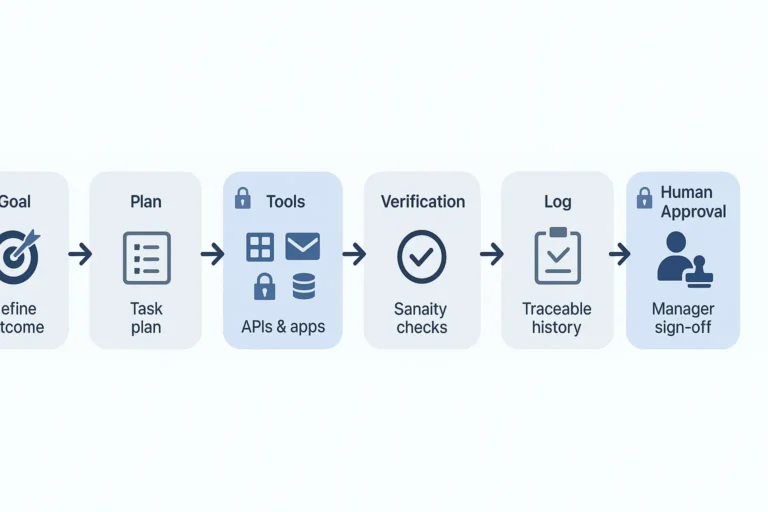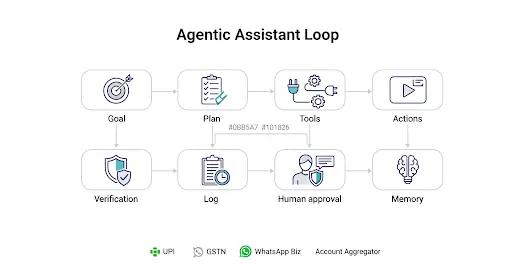
The moment GPT-5 stops feeling like a chatbot and starts acting like a teammate is the moment work changes.
Not a hype cycle—real leverage. Drafts that read like you, tables that actually add up, and small automations that cut hours from the boring bits. In 2025, the winners won’t be the people who “know about AI”; they’ll be the ones who use GPT-5 to review policies, reconcile numbers, plan campaigns, and ship ideas faster than their competition can schedule a meeting. This guide skips the fluff and shows the GPT-5 features you’ll actually use—today, this quarter, and when that deadline hits tomorrow morning.
Below is a hands on tour of 15 real features you should use across finance, accounting, taxation, operations, marketing, HR, education, and creative work. No fluff, just practical wins.
What’s different about GPT-5
- Deeper reasoning: better at multi-step tasks where earlier models lost the thread.
- Handles longer inputs: large documents, tables, and multi-file context feel less fragile.
- More “agentic”: you can ask for small workflows, not just paragraphs.
- Cleaner code: It can write scripts and help to make apps more efficiently and out of the box.
- Multimodal: it can read text plus images/screenshots to and produce the output “what changed?” questions.
Think of GPT-5 as the colleague who can read the packet, do the math, and write the email for you to avoid the repeating work.
1) Task Chains & Lightweight Agents
Tell GPT-5 a process, not only an answer:
- “Import these two CSVs, reconcile mismatches, draft a variance note, and create an action list.”
- “Skim this policy PDF plus meeting notes and draft an SOP with a 7-point control checklist.”
Why it matters: repetitive workflows become your just one prompt task that you can reuse every month.
2) Long-Form Recall (Big Docs Without Tears)
You can feed GPT-5 multi-document context, policy PDFs, contracts, spreadsheets and it keeps the narrative coherent.
Use it for: audit narratives, client advice notes, or a research pack that spans 10+ sources.
3) Spreadsheet-Native Thinking
Ask GPT-5 to:
- Summarize a data table with top variances and likely drivers
- Produce tidy tables you can paste back into Excel or Google Sheets
- Suggest the next data cuts to validate a hypothesis
Finance example: “Show the 10 largest OpEx jumps by cost center and write two lines of likely causes for each.”
4) Practical Code Generation
You don’t have to be a developer to benefit. Typical one-hour wins:
- A Python script that dedupes invoices and flags odd vendor terms
- A small web form that normalizes expense claims and exports a clean CSV
- A webhook that routes customer emails into the right Slack channel
Tip: ask for comments in the code and a short README so in future you remembers how to run it.
5) Multimodal Understanding (Screenshots, Charts, Scans)
Drop in a screenshot of a dashboard, a scanned invoice, or a messy export and ask:
- “What changed month-over-month?”
- “Which lines look mis-keyed?”
- “Summarize the key metrics for the COO.”
Great beyond finance too: product UI reviews, competitor pricing pages, and slide-deck summaries.
6) Voice, Meetings & Action Items
Use GPT-5 to condense call notes, tag action items, and draft follow-ups in your tone.
For busy teams, this alone pays for itself: the time saved on “who’s doing what by when?” is huge.
7) Roles, Templates & House Style
Create a reusable role (e.g., “You are my FP&A analyst,” or “You write in CamsRoy’s voice: crisp, helpful, zero jargon”).
Pair it with templates:
- “Variance note v2”
- “Client advisory memo (tax)”
- “Policy page (compliance)”
Result: consistent quality without rewriting the rules every time.
8) Grounded Answers with Your Own Sources
Point GPT-5 at your knowledge base, past memos, SOPs, product docs, help centre and have it quote or footnote.
Why it matters: It reduces the chances of inaccurate information with right prompt and enforces “how we do things here.”
9) Productivity Connectors (Email, Calendar, Docs)
With the right plugins or API glue, GPT-5 can:
- Draft replies to priority emails
- Turn agenda + notes into action plans
- Create a post-meeting summary and file it in your doc system
Non-finance win: content teams can convert a brainstorm doc into a weekly calendar in minutes.
10) Cost-Smart Tiers & Routing
Not everything needs the biggest engine. Route simple extraction or formatting to a lighter tier and keep heavy reasoning for the full model.
Takeaway: better performance and lower bill.
11) Tone Control & Brand Consistency
Lock in a voice guide, sentence length, banned phrases, reading level, and tone rules (e.g., “no fear-mongering, be precise and optimistic”).
Marketing/Support: helpful in maintaining brand voice across blog posts, release notes, and help to write your articles.
12) Document Wizards (Policies, SOPs, Letters)
Give GPT-5: purpose, audience, constraints, and a few snippets you trust.
Get back: a clean first draft with a contents block, headings, and checklists—ready for human polish.
Accounting: AP policy, revenue recognition memo, fixed-asset capitalization policy.
13) Ask-Your-Data (RAG Done Right)
Connect GPT-5 to a curated folder of PDFs, spreadsheets, and prior work.
Then ask: “What did we conclude last time this issue came up?” or “Show me the client mail we used for a similar case.”
Outcome: organizational memory on tap.
14) Reliability for Repeats
Save the prompt, save two “golden” test inputs, and re-run after you or the model updates.
This is how you productionize GPT-5: same tasks, same quality bar, fewer surprises.
15) Privacy & Admin Controls
Role-based access, audit trails, redaction prompts, and “no sensitive data” guardrails help teams stay inside policy.
Best practice: mask PANs, bank details, or any PII before upload; keep sensitive truth in your own store and retrieve only snippets.
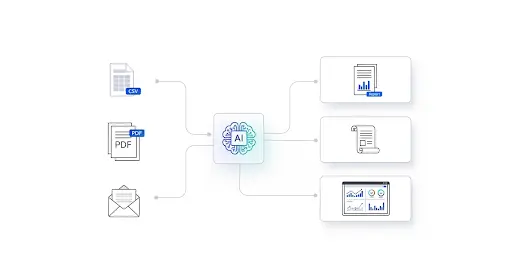
Finance, Accounting & Tax: 7 Copy-Paste Workflows
- Month-End Copilot
“Combine these GL exports, highlight top 8 variances by absolute and % change, draft a 200-word note with actions.” - Tax Change Brief
“Summarize the latest guidance on input tax credit with a 5-point ‘What SMBs should do’ checklist.” - Audit Workpaper Writer
“From these test results, draft the control objective, test steps, exceptions, impact, and management response.” - Expense QA
“Scan this month’s expense CSV. Flag duplicate receipts, suspicious merchants, and claims outside policy.” - Vendor Terms Radar
“Read these contracts; list penalties, renewal windows, and price-increase clauses into a table.” - Board-Ready FP&A Summary
“Create a one-page executive summary with charts: revenue, margin, cash, and 3 bullets on risks & mitigations.” - Client Advisory Email
“Turn this memo into a plain-English client email in 180–220 words with a short CTA to book a call.”
Non-Finance: Big Wins for the Rest of the Org
Marketing
- Repurpose a webinar into a blog + 3 LinkedIn posts + 6 short-video hooks.
- Draft a content calendar with themes, CTAs, and basic SEO slugs.
Sales
- Persona-specific outreach, proposal skeletons, and objection handling notes.
- Summaries of discovery calls with next-step prompts.
HR & L&D
- Role scorecards, onboarding checklists, policy FAQs, and micro-lessons from SOPs.
Product & Engineering
- Condense user interviews; create problem statements and acceptance criteria.
- PR summaries, test cases, and light refactors with commentary.
Customer Support
- Tone-consistent replies, knowledge-base updates, and auto-tagging guidance.
Education & Creators
- Study guides from textbooks, quizzes, lesson plans, and podcast outlines.
How to roll this out without chaos
- Pick 3 recurring tasks that eat your time every week.
- Write “definition of done” (Advance Prompt) for each (length, tone, must-include data).
- Build a reusable prompt plus sample input plus sample output.
- Run for two weeks, log edits, and tighten the prompt.
- Add guardrails (PII (Personally identifiable Information) redaction, approval steps).
- Route cheaper sub-steps to a lighter tier for cost control.
That’s it. You have to just operationalized GPT-5 in a way your team will actually keep using it.
FAQs
- Is GPT-5 overkill for small teams?
No. Start with everyday workflows, reports, summaries, and email. Add automation later. - What makes GPT-5 better than “last year’s model”?
It keeps context better, reasons across multiple steps, and produces more reliable code and tables. - Can I trust it with compliance or tax notes?
Use your own source pack (laws, circulars, prior memos) and ask GPT-5 to cite or quote. Always review before sending. - How do I keep costs in check?
Route simple extraction/formatting to a lighter tier; reserve heavy reasoning for the full model. - Do I need a developer?
Not to start. GPT-5 can bootstrap scripts and explain how to run them. For anything critical, get an engineer to review.
Conclusion — Your Next Week With GPT-5 Starts Now
Here’s the truth: tools don’t create leverage—how you use them does. You’ve just seen the GPT-5 moves that actually save time: long-doc recall without losing the plot, small automations that clean up the boring bits, and drafts that sound like you instead of a bot. If you put even two of these to work this week, you’ll feel the shift—from “AI as a novelty” to AI as a teammate.
Do this in the next 48 hours:
- Pick one recurring task (variance note, SOP, meeting summary).
- Paste in the ready prompt, add your files, and ship the first draft.
- Save it as a template and schedule it for next week.
Tiny wins compound—by Friday, you’ll have hours back and a repeatable workflow you trust.
If you’re still on the fence, remember: the gap won’t be between people who “know about AI” and those who don’t—it’ll be between teams that standardize GPT-5 for everyday work and teams that keep tinkering. The first group moves faster, writes clearer, and makes better decisions with the same headcount. That can be you.
Grab this to go further:
- Download the free Model Selection Flowchart + Prompt Pack to pick the right model in seconds and copy-paste the exact prompts used here.
- Compare models next: Read GPT-5 vs Claude Opus 4.1 vs Grok 4 for when you need careful reasoning or real-time web context.
- Share a win: Tell me which GPT-5 workflow saved you the most time—I’ll add the best ones to an upcoming guide (with credit).
Bottom line: Start small, standardize fast, and let GPT-5 carry the weight you shouldn’t be lifting anymore.
Disclaimer
Content on CamsRoy.com is for general information only and isn’t financial, tax, legal, or professional advice. Please verify details and consult a qualified professional for your situation.
This post may contain affiliate links—we may earn a commission at no extra cost to you (as an Amazon Associate, we earn from qualifying purchases). Prices, features, and availability can change; external sites are outside our control.