

Insights on AI in Finance, Smart Work & Tools
Practical articles, real-world examples, and honest AI tool reviews—focused on finance, productivity, and smarter ways of working.
INSIGHTS OVERVIEW
What You’ll Find Here
This page brings together practical AI insights on how AI is applied in finance, productivity, and modern workflows—along with honest reviews of tools professionals actually use. Each section focuses on real use-cases, clarity, and outcomes over hype.
Smarter workflows start with smarter tools. Discover how AI helps professionals get more done.
Browse Insights by Category
Browse practical articles and reviews on AI tools, smart finance, and productivity—organized by category to help you quickly find what matters most.
AI Tool Reviews
ChatGPT-5 (2025) Review: What’s Real, What’s New, and How to Use It Well
This no-hype ChatGPT 5 review explains what truly changed, how Thinking mode helps, and the exact Plan→Draft→Verify→Improve routine I use. See practical workflows, India’s Go plan, and clear picks
Claude in 2025: The Best First-Pass Writer for Policies, Finance Memos & SOPs
Stop fighting the blank page. In 2025, Claude stands out as a calm, careful first‑pass writer for policy documents, finance narratives, and SOPs. This guide shows where Claude 2025 fits, how to prompt it, how to pair it with companion tools, and how to measure ROI within 30 days.
The 25 Must-Try AI Tools in 2025 That Will Change How You Work Forever
Stop chasing every shiny AI tool. Here are the 25 that actually deliver results—complete with real pricing, honest pros and cons, and a 30-day rollout plan many teams use to save hours each week.
Forget Sora—Here’s Why Google Veo 3 Is the Real AI Video Gamechanger
Everyone’s been talking about Sora, but Google’s new Veo 3 might just be the AI video tool that changes everything. Unlike its rivals, Veo 3 doesn’t just generate visuals—it adds synchronized audio, dialogue, and even background music, making it a true one-stop solution for creators. From YouTube Shorts integration to lightning-fast prototyping, here’s why I believe Veo 3 is the real gamechanger in 2025.
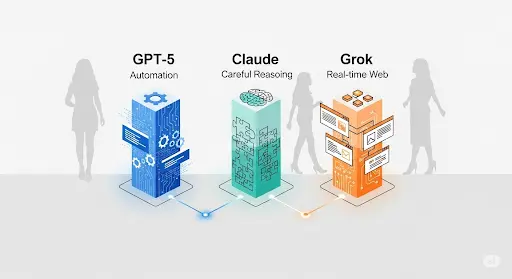
GPT-5 vs Claude Opus 4.1 vs Grok 4: The Only 2025 Guide You Need (With Real-World Use Cases)
A practical 2025 comparison of GPT-5, Claude Opus 4.1, and Grok 4—what each model does best, real workflows for finance and beyond, and a simple playbook to pick the right tool without wasting time or budget.




Smart Finance with AI
How to Improve Cash Flow in Business: A Practical Framework with AI Insights
Cash flow determines business survival, not just profitability. This guide explains how to improve cash flow in business using practical strategies, working capital management, and AI-powered tools for better financial control.
Profit vs Cash Flow: Key Differences + Why Profitable Businesses Still Fail (2026 Guide)
Profit does not always mean financial health. This guide explains the key difference between profit and cash flow, why businesses fail despite profits, and how to manage liquidity using practical strategies and AI-powered tools.
AI Loan Planning Tools in India (2026 Guide to Reducing EMI & Interest)
Taking a loan in 2026? Even a 1% interest difference can cost you ₹3–5 lakh extra over time. Discover how AI loan planning tools calculate safe EMI, simulate rate hikes, and help you reduce total interest before you borrow.
How AI Can Improve Your Credit Score in India (Step-by-Step Guide)
Learn how AI credit score improvement works in India. Discover what lowers your CIBIL score, how AI monitoring tools analyse behaviour, and a practical 90-day action plan to increase your credit score before your next loan application.
Best AI Expense Tracker Tools for Professionals in 2026
Still wondering where your money goes every month? In 2026, AI expense tracker tools help professionals move beyond basic tracking to real financial clarity. From smart categorisation to spending insights, this guide reviews the best AI expense management tools and shows how professionals can choose the right tool for better control and consistency.
How AI Can Help You Manage Personal Finance More Effectively
Managing personal finance feels complex for many people. This article explains how AI simplifies budgeting, expense tracking, and financial planning in everyday life.


Work Smarter with AI
AI Image Generation Prompts for Marketing Visuals (Gemini)
Unlock 36 Gemini-ready prompts—clean, numbered, and copy-paste easy. Get instant results with quick usage tips and a no-jargon safety note.
AI Image Generation Prompts for Ecommerce (Gemini): 30 Ready-to-Paste Scenes
A clean, copy‑paste pack of 30 Gemini-friendly prompts for ecommerce visuals—catalog, lifestyle, UGC, banners, and performance ads—plus usage tips and a compliance-first disclaimer.
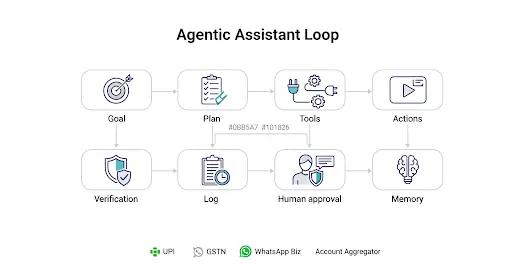
Agentic AI 2025: Autonomous Assistants That Actually Get Work Done
What agentic AI really is, how it differs from “AI agents”, where it helps first in India, and a 30-60-90 rollout—plus CFO-proof ROI and safety by design.
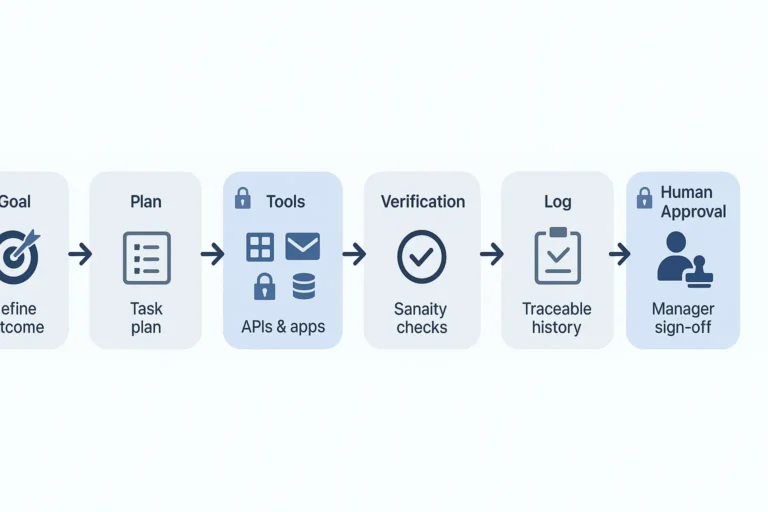
AI Agents: The New Workforce Revolutionising Your Job in 2025
Turn AI agents into results: save hours, reduce errors, and keep clean audit logs. Step-by-step rollout with ROI math and examples.
Claude in 2025: The Best First-Pass Writer for Policies, Finance Memos & SOPs
Stop fighting the blank page. In 2025, Claude stands out as a calm, careful first‑pass writer for policy documents, finance narratives, and SOPs. This guide shows where Claude 2025 fits, how to prompt it, how to pair it with companion tools, and how to measure ROI within 30 days.
AI Prompt Engineering in 2025: The New Professional Literacy
In 2020, AI wrote me a GST article that was technically correct but useless. By 2025, I rely on AI daily—ChatGPT for insights, Claude for reasoning, and Google Veo 3 for ad scripts. The difference? Not the model, but the prompt. Learn how prompt engineering has become the must-have skill for professionals in 2025.


Free Downloads
AI Model Selection Flowchart + Prompt Pack (Free PDF)
Pick GPT-5, Claude, or Grok in seconds. Free flowchart + prompt pack with copy-paste templates for finance and beyond.

Latest Post from Our Guides & Insights
How to Improve Cash Flow in Business: A Practical Framework with AI Insights
Cash flow determines business survival, not just profitability. This guide explains how to improve cash flow in business using practical strategies, working capital management, and AI-powered tools for better financial control.
Profit vs Cash Flow: Key Differences + Why Profitable Businesses Still Fail (2026 Guide)
Profit does not always mean financial health. This guide explains the key difference between profit and cash flow, why businesses fail despite profits, and how to manage liquidity using practical strategies and AI-powered tools.
AI Loan Planning Tools in India (2026 Guide to Reducing EMI & Interest)
Taking a loan in 2026? Even a 1% interest difference can cost you ₹3–5 lakh extra over time. Discover how AI loan planning tools calculate safe EMI, simulate rate hikes, and help you reduce total interest before you borrow.
How AI Can Improve Your Credit Score in India (Step-by-Step Guide)
Learn how AI credit score improvement works in India. Discover what lowers your CIBIL score, how AI monitoring tools analyse behaviour, and a practical 90-day action plan to increase your credit score before your next loan application.
Best AI Expense Tracker Tools for Professionals in 2026
Still wondering where your money goes every month? In 2026, AI expense tracker tools help professionals move beyond basic tracking to real financial clarity. From smart categorisation to spending insights, this guide reviews the best AI expense management tools and shows how professionals can choose the right tool for better control and consistency.
How AI Can Help You Manage Personal Finance More Effectively
Managing personal finance feels complex for many people. This article explains how AI simplifies budgeting, expense tracking, and financial planning in everyday life.
Looking for the Right AI Tools & Compliance Resources?
Explore curated tax and finance resources on TaxBizMantra, along with smart AI workflows you can start using today.
A Practical, No-Hype Approach to AI
Workflows, prompt frameworks, model-specific tweaks, and downloadable templates
AI shouldn’t feel overwhelming. The insights and tutorials here are built from real finance, operations, and content workflows—not theory. You’ll find copy-ready prompt frameworks, clear explanations of when to use specific models, and practical templates designed to save time and reduce trial-and-error.
If you’re new, start with the fundamentals of prompt structure—role, task, context, style, and quality checks. If you’re evaluating tools, the comparisons focus on real use-cases, limitations, and outcomes rather than feature lists. Everything is kept practical: short steps, visual examples where useful, and resources you can apply immediately.
Why This Approach Works
Busy professionals don’t need hype—they need repeatable systems. Every guide here is tested in real-world scenarios where accuracy, governance, and hand-off matter. In many cases, a well-structured prompt outperforms complex agents; in others, a model-specific adjustment can save hours of rework.
The focus is always clarity first, followed by defensible ROI and practical guidance your team can actually use. This makes the insights reliable not just for experimentation, but for day-to-day professional work.
Get Weekly Updates on Smart AI Tools
Practical AI tools, insights, and templates to simplify your workflow—delivered straight to your inbox.
FAQ-AI Insights & Tutorials
Q1. What’s the fastest way to get value from AI at work?
Start with repeatable prompts (role → task → include → style → QC). Pilot one workflow, measure hours saved, then scale.
Q2. Veo 3, Sora, or Gemini—how do I choose?
Veo 3 for ad-style video polish, Sora for long coherent scenes (when available), Gemini for tight text-to-task flows. Match tool to output, not hype.
Q3. How do I estimate ROI for AI projects?
Benefit/month = hours saved × blended rate + errors avoided × cost/error + cash acceleration from DSO cuts. Compare to monthly cost and payback.
Q4. Are your prompts model-specific?
Yes—core structure is the same, but I note tweaks for GPT, Claude, and Gemini where it meaningfully improves results.
Q5. Where can I download templates and calculators?
See Free Downloads for prompt sheets, ROI calculators, and checklists.
Q6. What makes these AI insights different?
They’re hands-on and workflow-first—every post shows prompts, outputs, and ROI notes you can replicate at work.
Q7. Which prompts should I start with?
Use the role → task → include → style → QC framework and begin with one daily task (email drafts, summaries, checklists). See Prompt Engineering Basics
Q8. GPT, Claude, or Gemini—how do I pick for text tasks?
Pick by constraint: accuracy & tools (GPT), reasoning & longer context (Claude), tight Google-suite flows (Gemini). Test with the same prompt and adopt the most reliable.
Q9. Is it safe to paste client data into AI tools?
Avoid raw PII. Redact or hash sensitive fields, use enterprise plans with audit logs, and keep private data on systems with DPA/SOC2/ISO controls. Treat outputs as drafts and review.
Q10. What metrics prove AI ROI to a CFO?
Hours saved, error rate, throughput per FTE, cycle-time (e.g., DSO), and rework %
Q11. How do I keep prompts consistent across my team?
Standardize templates, keep a central SOP, version them (v1.2, v1.3), and store in Notion/Drive. Add examples and “quality check” steps to reduce rework.
Q12. Veo 3 vs Sora vs Gemini for video—quick rule of thumb?
Veo 3 for polished ads/clips, Sora for long coherent scenes (where available), Gemini for script → assets → export pipelines. Match tool to output length and control.
Q13. Will AI replace my team?
Not if you design for co-pilot use: AI drafts, humans review/approve. This boosts speed and quality without losing accountability.
Q14. How often are these AI tutorials updated?
Monthly, and faster after major model updates. Look for the “Updated” tag on post cards.