In 2025, AI tools are no longer experimental — they are core productivity engines for finance professionals, business owners, and knowledge workers. But with hundreds of options available, which AI tools actually deliver measurable results?
Quick Summary — best AI tools 2025
- Adopt five tools first: one copilot, one design tool, one video tool, one automation layer, one SEO suite.
- Budget $50–100 per employee/month; track minutes saved and review cycles weekly to prove ROI.
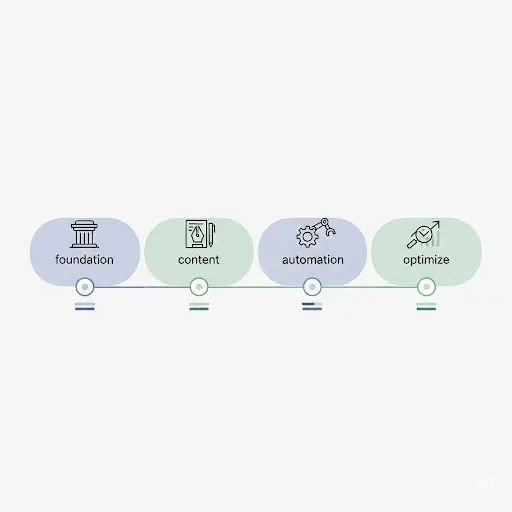
- Run the 30-day rollout: foundation → templates → three automations → optimize/cut.
- Enterprise tiers (Copilot/Gemini/ChatGPT Business) don’t train on your data; permissions hygiene still matters most.
- Largest gains come from integration and iteration, not model switching.
Why the best AI tools 2025 matter now
In 2025, AI is no longer sits on the sidelines. It shows up where work actually happens inside documents, spreadsheets, email, chat, and meetings,so drafting, calculating, and presenting can happen with less context switching and far fewer copy‑paste rituals that quietly drain hours.
Meanwhile, text‑to‑video systems have matured into reliable helpers for 15–30‑second explainers, product mockups, and storyboard clips that are good enough for stakeholder review, which means teams can test ideas the same day they are proposed rather than waiting for a full production cycle that may or may not validate the concept.
As per my views, the biggest unlock is not chasing the most novel model but building a compact, interoperable stack, one primary copilot supported by a handful of specialists because small, well‑connected systems reduce friction, improve adoption, and return time to the schedule. This guide highlights the best AI tools 2025 for real work—clear pricing, security notes, and a simple rollout plan.
What changed in 2025
Productivity suites embedded AI directly into the tools people already open every morning. That single move lowered the barrier to entry, because users could request help in familiar interfaces—Word, Excel, PowerPoint, Teams, Gmail, Docs, Sheets, and Meet—without learning yet another app.
Creative tooling crossed an important threshold. Generative images and fill are now dependable for draft visuals, and short video is fast enough for B‑roll and concepting, so teams can iterate visually before committing budget to polished production.
Research assistants improved at citing sources and summarizing long documents, while spreadsheet‑aware analysis made quick charts and sanity checks routine. Automation platforms narrowed the gap between idea and execution by accepting plain‑language steps.
As per my views, the practical lesson is straightforward: fewer tools used more deeply outperform a long list of disconnected apps, particularly when governance and permissions are handled early.

1) Your AI command center: choose one primary copilot
The best AI tools 2025 start with one copilot that lives where your files already are. Choose the one that aligns with your suite to minimize friction, accelerate adoption, and reduce the need for duplicate logins and connectors.
- Microsoft 365 Copilot (Microsoft-first teams) — Embedded in Word, Excel, PowerPoint, and Teams. Price: ~US$30/user/month add‑on. Strengths: tenant‑aware grounding via Microsoft Graph; inherits identity, permissions, and compliance. Common wins: draft reports, outline slides, summarize meetings. Caveat: returns improve when SharePoint/OneDrive are tidy and a short enablement plan is in place.
- Gemini in Google Workspace (Google-first teams) — Native assist for Docs, Sheets, Gmail, and Meet. Price: included by plan; effective seat ~US$15–25. Strengths: help appears in familiar surfaces—Gmail drafting, Sheets formulas/cleanup, Meet notes. Caveat: if your source of truth lives in Microsoft repositories, expect some friction and plan for connectors.
- ChatGPT Business (mixed stacks / flexibility) — Broad drafting and analysis with hundreds of connectors (Drive, SharePoint, Slack, Jira, GitHub). Price: ~US$25/user/month. Security: data excluded from training by default; SOC 2; SSO; admin controls. Caveat: permission hygiene still matters; add a lightweight review step for client‑facing outputs.
Fast selection rule: Microsoft shop → M365 Copilot. Google shop → Gemini. Mixed or creator‑heavy → ChatGPT Business. As per my views, decide based on where your files live and which identity system governs access; that single decision removes more friction than endlessly comparing model benchmarks.
2) Create and design faster: images, slides, and short video
For content velocity, the best AI tools 2025 combine drafting, brand-safe images, and short video in one simple flow. here is the list of few best ai tools for creative and design.
- Grammarly Business (~US$15/user/month) enforces tone, clarity, and terminology so multi‑author documents read as a single, confident voice, which cuts revision cycles and protects brand consistency.
- Canva with AI (~US$15/user/month) converts plain‑English prompts into on‑brand graphics for decks, ads, and social; brand kits and templates help non‑designers ship passable assets quickly.
- Adobe Firefly (in Creative Cloud) focuses on commercially safe imagery and generative fill—useful when legal and licensing standards require confidence in usage rights.
- Runway (Gen‑3/Gen‑4) (~US$12–28/month, higher tiers available) and Luma Dream Machine (from ~US$10/month) produce short clips for explainers, product demos, and storyboards. Note the credit system and watermark rules, which vary by plan and should be understood before committing to a workflow.
Iteration trumps perfection: generate multiple variations, shortlist two, then refine. As per my views, time‑boxing concepting—say 45 to 60 minutes—keeps projects moving while still leaving room for taste and brand judgment.
3) Research, writing, and SEO: from hours to structured outputs
The best AI tools 2025 make research traceable and SEO briefs repeatable. Here is the list of few best ai tools that can be used for research and writing.
- Perplexity Pro (~US$20/month) returns answers with citations for market scans, competitor snapshots, and executive FAQs, which makes it suitable for quick briefing notes that still offer traceability.
- Claude is effective for long‑document reasoning—policies, proposals, contracts—surfaces risks, gaps, and next steps in plain language, and helps teams prepare summaries that are easy for stakeholders to evaluate.
- ChatGPT Advanced Data Analysis turns CSVs and spreadsheets into charts plus short narratives that drop directly into slideware, accelerating the jump from raw data to explainable visuals.
- Semrush (US$130+/month) and Ahrefs (US$99+/month) provide topic clusters, intent analysis, and competitive gaps, while integrated AI assistants help convert that insight into briefs that align with search behavior.
Recommendation: maintain a concise source log (links and assumptions) with each deliverable; as per my views, this small habit improves trust, accelerates sign‑off, and simplifies later updates.

4) Automation and operations: connect the workflow dots
The best AI tools 2025 matter most when they automate hand-offs between forms, CRM, docs, and chat. Here is the list of few best ai tools that can be used for automation and operation.
- Zapier with AI (from ~US$20/month) builds automations in plain language—forms to CRM, documents to email, notes to tasks—so teams can move from idea to working hand‑off without waiting for engineering time.
- Make (Integromat) (~US$9–29/month) handles more complex routing and multi‑system payloads, which is helpful when operations depend on several systems that must stay in sync.
- Notion AI (~US$10/user/month) turns databases into smart hubs by summarizing records, categorizing entries, and extracting action items; Slack AI provides channel digests and better search so people can catch up fast.
- Otter.ai and Fireflies.ai (approximately US$17 and US$10–39/user/month respectively) transcribe meetings, extract action items, and hand them off to PM or CRM tools to reduce missed follow‑ups.
Start with one automation, measure the minutes saved, then add the next. As per my views, three well‑chosen automations often recover meaningful team hours each week once hand‑offs stabilize and ownership is clear.
5) Code and data: ship features and insights faster
For engineering and analytics, the best AI tools 2025 accelerate routine tasks while keeping review in the loop. Here is the list of few best ai tools that can be used for code and data.
- GitHub Copilot Business (US$19/seat/month; Enterprise at a higher tier) suggests code, tests, and docstrings directly in mainstream IDEs, and organization policies help teams control usage patterns.
- Cursor provides a chat‑first IDE experience that learns the codebase, which can be useful for small teams moving quickly and iterating on product features.
- Sourcegraph Cody adds codebase‑aware reasoning at monorepo scale, aiding navigation and refactoring across very large repositories where context matters.
- ChatGPT Advanced Data Analysis supports exploratory data analysis, quick validation, and charting before BI dashboards are set up. As per my views, pair all of these with standard code review, tests, and data validation; AI suggestions raise speed but human checks preserve quality.
Practical application: a 30-day rollout plan
Week 1 — Foundation: choose one primary copilot aligned to your suite, enable three to five champions, and agree on two or three high‑value scenarios (for example, meeting notes to tasks, outline to draft, or light spreadsheet analysis to chart).
Week 2 — Content systems: add design and writing tools; create shared templates for newsletters, social posts, and slide outlines; measure creation time before and after AI to build a baseline.
Week 3 — Automation: implement three hand‑offs using Zapier or Make—for example, meeting notes to tasks per owner, form to CRM plus a welcome email, or daily sheet updates summarized to a Slack digest—and test with small samples before turning them on for everyone.
Week 4 — Optimization: review usage, cost per user, and time saved; keep what works and retire what doesn’t; publish light AI guidelines covering data scope, permissions, and quality checks. As per my views, a simple spreadsheet that tracks minutes saved, cycle times, error rates, and reduced contractor spend is enough to prove value before scaling licenses widely.
Governance, security, and compliance: simple rules that prevent rework
Confirm enterprise data handling (most business tiers exclude customer data from training) and review attestations such as SOC 2 or ISO as required by your industry; record the decisions so they are visible to audit and procurement.
Map permission hygiene: AI will surface what storage already exposes, so clean up folders, groups, and guest access early; in many organizations this one step removes surprise access later and avoids emergency rewrites.
Define data classes so teams know what is in‑bounds for AI, what must be masked or sampled, and what remains manual; add a short “Quality Check” block to client‑facing outputs that lists sources, assumptions, and risks.
Quick fit guide by industry
SMBs and agencies: ChatGPT Business, Canva, Runway/Luma, Zapier or Make, Semrush/Ahrefs—compact and versatile.
Finance/tax and compliance: M365 Copilot or Gemini for suite controls, Claude for policy tone and long summaries, Otter/Fireflies for audit trails.
E‑commerce: ChatGPT or Gemini for product copy, Canva for assets, Runway for ad concepts, Make for order/CRM automations, HubSpot AI for lifecycle email.
Education and knowledge organizations: Claude for long summaries, Notion/Slack AI for retrieval, Perplexity for sourced research.
Conclusion: what the facts suggest—and the next practical step
Across the evidence, a repeatable pattern emerges: AI delivers the most value when it operates close to your files and conversations, when a small set of well‑chosen tools work together without friction, and when a few targeted automations carry information from one system to the next so people don’t have to; as per my views, the low‑risk path is to select one copilot aligned to your suite, add design/video/SEO where work slows down, and wire two or three hand‑offs so results show up within a month.
Frequently asked questions
How much should we budget per employee?
Plan US$50–100 per employee/month for a complete stack. Start with one copilot (~US$25–30) and add specialists only after measured wins.
Which AI assistant should come first?
Match your suite: M365 Copilot for Microsoft shops, Gemini for Google Workspace, ChatGPT Business for mixed environments.
How do we measure ROI?
Track minutes saved, cycle times, error/revision counts, and reduced contractor spend; review at day 30 and day 60 to decide what to expand or retire.
Are these tools secure enough for business use?
Enterprise tiers generally exclude customer data from training and provide admin controls, but you should validate data residency, retention, and permission models for your environment.
What if adoption is slow?
Nominate champions, provide templates, and share before/after examples; peers influence behavior more than mandates, and quick wins tend to spread.
Further reading and sources
Official documentation & pricing: Microsoft 365 Copilot Overview; ChatGPT Business Plans; Google Workspace AI Features; GitHub Copilot for Business.
Industry reports & data: McKinsey State of AI; Microsoft Work Trend Index; Salesforce State of the Connected Customer.
Tool‑specific resources: Runway AI Tutorials; Zapier AI Automation Examples; Perplexity for Business; Canva Design School.
Security & compliance: OpenAI Enterprise Privacy; Microsoft AI Responsible Use; Google Cloud AI Security.
Disclaimer: This content is for information and education only and is not legal, financial, security, or procurement advice. Features, pricing, and availability can change; always confirm on the vendor’s site and follow your organization’s policies before using any AI tool or prompt. Some links may be affiliate links—we may earn a commission at no extra cost to you.